

API and API keys
Moparmeg API keys — creating a key, its scopes, copying and revoking
An API key opens, for your program — including the Moparmeg desktop app — the v1 API endpoints its scopes allow: 8 scopes you choose from at creation, which cannot change afterwards. You create it in the dashboard, you see it in full once, and afterwards we keep only its fingerprint and last four characters.
On this page
Where to find the page
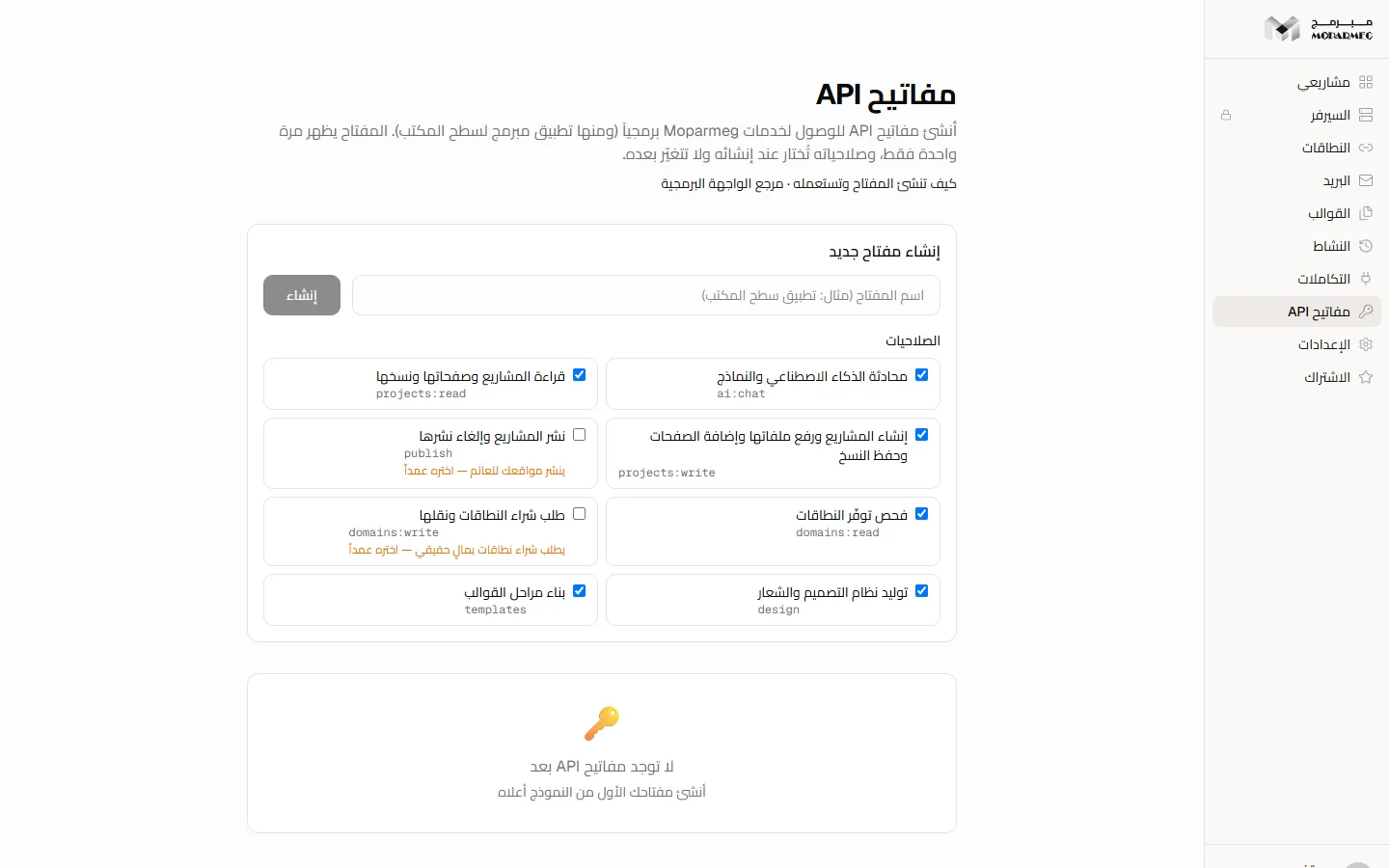
In the dashboard sidebar choose «مفاتيح API» (API keys), or open /api-keys directly. The page requires sign-in; if your session expires while it is open, it sends you to the login page and back. Under the heading it reads «أنشئ مفاتيح API للوصول لخدمات Moparmeg برمجياً (ومنها تطبيق مبرمج لسطح المكتب). المفتاح يظهر مرة واحدة فقط، وصلاحياته تُختار عند إنشائه ولا تتغيّر بعده.» (Create API keys to access Moparmeg services programmatically, including the Moparmeg desktop app. The key is shown only once, and its scopes are chosen when it is created and do not change afterwards.) Below it are two links: «كيف تنشئ المفتاح وتستعمله» (How to create and use the key — this page) and «مرجع الواجهة البرمجية» (API reference).
Creating a new key
- In the «إنشاء مفتاح جديد» (Create a new key) box, type a name that reminds you where the key is used, in the field whose placeholder reads «اسم المفتاح (مثال: تطبيق سطح المكتب)» (Key name, e.g. desktop app).
- Under «الصلاحيات» (Scopes), keep ticked only what your program needs (see Scopes). Every scope is ticked in advance except publishing and domain purchases.
- Press «إنشاء» (Create); it shows «جارٍ...» (Working...) while the key is minted. The button stays disabled while the name is empty or no scope is ticked.
- The full key appears in a banner above the list — copy it now (see Copying).
Server rules:
- The name is required and at most 64 characters; otherwise you get «الاسم يتجاوز 64 محرفاً» (The name exceeds 64 characters).
- An account can hold at most 20 active keys. At the limit you get «بلغتَ الحدّ الأقصى (20 مفتاحاً) — أبطِل مفتاحاً قبل سكّ آخر» (You reached the maximum of 20 keys — revoke one before minting another). Revoked keys do not count.
- Scopes are stored with the key and cannot be edited afterwards: to change them, create a key with the new scopes and revoke the old one.
- Any account can create a key, but calling the API with it needs a paid plan (see Availability by plan).
Scopes
Each scope appears in the form under its Arabic name with its identifier beneath. An endpoint opens only for a key that holds its scope; otherwise the call is refused with 403 and the code API_KEY_SCOPE_REQUIRED, and the response names the missing scope in the scope field.
| Identifier | Name on the page | What it opens | Ticked in advance |
|---|---|---|---|
ai:chat | «محادثة الذكاء الاصطناعي والنماذج» (AI chat and models) | POST /api/v1/chat/completions, GET /api/v1/models, POST /api/v1/ai | Yes |
projects:read | «قراءة المشاريع وصفحاتها ونسخها» (Read projects, their pages and versions) | GET /api/v1/projects, GET /api/v1/projects/{id}, GET /api/v1/projects/{id}/pages, GET /api/v1/projects/{id}/versions | Yes |
projects:write | «إنشاء المشاريع ورفع ملفاتها وإضافة الصفحات وحفظ النسخ» (Create projects, upload their files, add pages and save versions) | POST /api/v1/projects, PUT /api/v1/projects/{id}, POST /api/v1/projects/{id}/pages, POST /api/v1/projects/{id}/versions | Yes |
publish | «نشر المشاريع وإلغاء نشرها» (Publish and unpublish projects) | POST /api/v1/projects/{id}/publish | No |
domains:read | «فحص توفّر النطاقات» (Check domain availability) | GET /api/v1/domains/availability | Yes |
domains:write | «طلب شراء النطاقات ونقلها» (Request domain purchases and transfers) | POST /api/v1/domains/orders | No |
design | «توليد نظام التصميم والشعار» (Generate the design system and logo) | POST /api/v1/design/system, POST /api/v1/design/logo | Yes |
templates | «بناء مراحل القوالب» (Build template stages) | POST /api/v1/templates/build | Yes |
The two scopes not ticked in advance carry warnings: «ينشر مواقعك للعالم — اختره عمداً» (Publishes your sites to the world — choose it deliberately) for publish, and «يطلب شراء نطاقات بمالٍ حقيقي — اختره عمداً» (Requests domain purchases with real money — choose it deliberately) for domains:write. GET /api/v1/me accepts any valid key without a scope, and templates, sections and downloads are public and need no key — details in the API reference.
Legacy keys
A key created before scopes existed shows «مفتاح قديم بلا صلاحيات: توليد الكود وقائمة المشاريع وإنشاؤها فقط» (Legacy key without scopes: code generation and listing and creating projects only) on its card. It keeps working on POST /api/v1/ai and GET and POST /api/v1/projects (and on GET /api/v1/me), and gets 403 on every other endpoint. It is not upgraded automatically: to reach the rest, create a key with scopes and revoke the old one.
Copying: the key is shown once
After creation the banner reads «تم إنشاء المفتاح بنجاح! انسخه الآن — لن يظهر مرة أخرى.» (Key created! Copy it now — it will not be shown again.) Next to the key is a «نسخ» (Copy) button that turns into «تم النسخ!» (Copied!) for two seconds. The banner stays until you leave or reload the page, or create another key.
Key format: the prefix mop_ followed by 32 characters from A-Z a-z 0-9 _ - (36 characters in total), generated from 24 random bytes. The server does not store the key itself, only its sha-256 fingerprint and its last four characters. So a lost key cannot be recovered, not by you and not by support: create a new key and revoke the old one.
Authorization: Bearer mop_XXXXXXXXXXXXXXXXXXXXXXXXXXXXXXXXThe key list
Each active key has a card showing:
- The name you chose.
- The key masked like this:
mop_••••••••abcd— the prefix, eight dots and the last four characters, so you can tell keys apart without exposing them. - «أُنشئ:» (Created:) with the creation date, and «آخر استخدام:» (Last used:) once the key has been used. Last-used is written at most once a minute, so it is accurate to about a minute.
- The key's scopes by name, or the legacy-key notice if it was created before scopes.
With no keys the page shows «لا توجد مفاتيح API بعد» (No API keys yet) and «أنشئ مفتاحك الأول من النموذج أعلاه» (Create your first key with the form above). Revoked keys are not listed.
Revoking a key
- Press «إلغاء المفتاح» (Revoke key) on the key's card.
- Two buttons appear: «تأكيد الحذف» (Confirm delete) to revoke it, or «إلغاء» (Cancel) to back out.
Revocation is immediate: the server checks the key's state on every call, so the first call after revoking is refused with 401. The record is kept (who used what and when), but there is no way to re-enable a revoked key — create another.
All your keys are revoked automatically, together with your sessions, when you change or reset your password and when the account is deleted or suspended. A deleted account is not opened by any key, even one that escaped revocation.
Expiry
The server supports an optional lifetime of 1 to 365 days through the expiresInDays field at creation; after it passes the key is refused with 401, like a revoked one. A key without a lifetime never expires until you revoke it.
Setting an expiry from the page's form: Not available yet — the form sends only the name and the scopes, and the expiry date is not shown on the key card. You can set a lifetime by calling POST /api/v1/api-keys from the same browser while signed in; details in the API reference.
Availability by plan
A key's hourly call cap equals your plan's daily AI quota, and a plan whose quota is zero cannot use the API at all. The cap belongs to your account, not to each key: creating a second key does not double it. Calls to GET /api/v1/me do not count against it and have their own cap of 120 calls per hour.
| Plan | API calls per hour (whole account) | AI requests per day |
|---|---|---|
| «المجانية» (Free) | 0 (key calls refused with 403 or 402, except /api/v1/me) | 0 |
| «الأساسية» (Basic) | 50 | 50 |
| «المميزة» (Premium) | 200 | 200 |
| «الاحترافية» (Professional) | 1000 | 1000 |
On the «المجانية» (Free) plan you can create a key, but its calls are refused: endpoints under the hourly cap return 403 with the code API_REQUIRES_PAID_PLAN, and the AI endpoints POST /api/v1/ai, POST /api/v1/chat/completions, GET /api/v1/models, POST /api/v1/design/system and POST /api/v1/design/logo return 402 with the code AI_PAID_ONLY before that. Only GET /api/v1/me answers, so your program can show the plan and why AI is refused. If your plan drops to «المجانية» (Free), your keys stay in the list and their calls are refused the same way until you are back on a paid plan. Compare plans in Billing and plans.
AI requests made with a key (chat, code generation, design system and logo) count against the same daily quota the editor uses in the browser — see Building with AI.
If your key leaks
What someone holding your key can do depends on its scopes, so give each key the least it needs. With the scopes ticked in advance it can:
- Read the projects you own in full, files included, and read their pages and versions (
projects:read). - Create projects, add pages whose files are written into the project, and save versions (
projects:write). - Spend your AI quota through chat, code generation, the design system and the logo (
ai:chatanddesign); the design system and the logo write into the named project's files. It uses both the hourly cap and the daily quota, which can lock you out of AI in the editor until the quota renews. - Build template stages and check domain availability (
templatesanddomains:read).
If you granted publish, it can publish and unpublish your projects. If you granted domains:write, it can submit domain purchase or transfer orders in your name — an order priced after team review, not an immediate purchase.
What no key can do:
- Create, list or revoke keys — key management takes the browser session only, so a stolen key cannot renew itself or widen its scopes.
- Sign in to your dashboard, or change your password, email or billing.
- Reach projects you do not own, even ones where you are an accepted collaborator: a key sees its owner's projects only.
- Manage webhooks, delete a project, restore an earlier version or edit a specific file — there is no key-authenticated endpoint for that, and the rest of the platform's routes accept the browser session, not the key.
What to do: press «إلغاء المفتاح» (Revoke key) then «تأكيد الحذف» (Confirm delete) on the leaked key, create a new key, and update it wherever you use it. Identify the leaked key by its last four characters and its «آخر استخدام:» (Last used:) date. If you suspect the account itself is exposed, change your password; that revokes every key and session at once.
Do not put the key in code that runs in a visitor's browser or in a public repository; use it from your server or the command line. Start at Quickstart.
FAQ
I forgot to copy the key. Can it be shown again?
No. The server does not keep the key itself. Revoke it and create another.
Can I create a read-only key or a key with limited permissions?
Yes. At creation, untick every scope except projects:read; the key then reads your projects without editing, publishing or spending AI quota. Scopes cannot be edited after creation.
Why does my new key get 403?
For one of two reasons, told apart by the code field in the response body: API_REQUIRES_PAID_PLAN when your account is on the «المجانية» (Free) plan (the API is for paid plans only), or API_KEY_SCOPE_REQUIRED when the key lacks the endpoint's scope, which is named in scope.
Can a key be used for webhooks?
Webhooks exist per project on its settings page, and are managed with the project owner's browser session, not with a key; they need a plan that includes hosting. Publishing a project with a key that holds publish does fire the project.published event, just as publishing from the editor does. See Project settings and the API reference.