

Projects and templates
Industry website templates in Moparmeg
A template in Moparmeg is a complete site for a specific line of business, built from a ready section library without calling any AI model. That is why it is half of what the Free plan offers; the other half is the visual editor you use to change the site once it exists.
On this page
What a template is
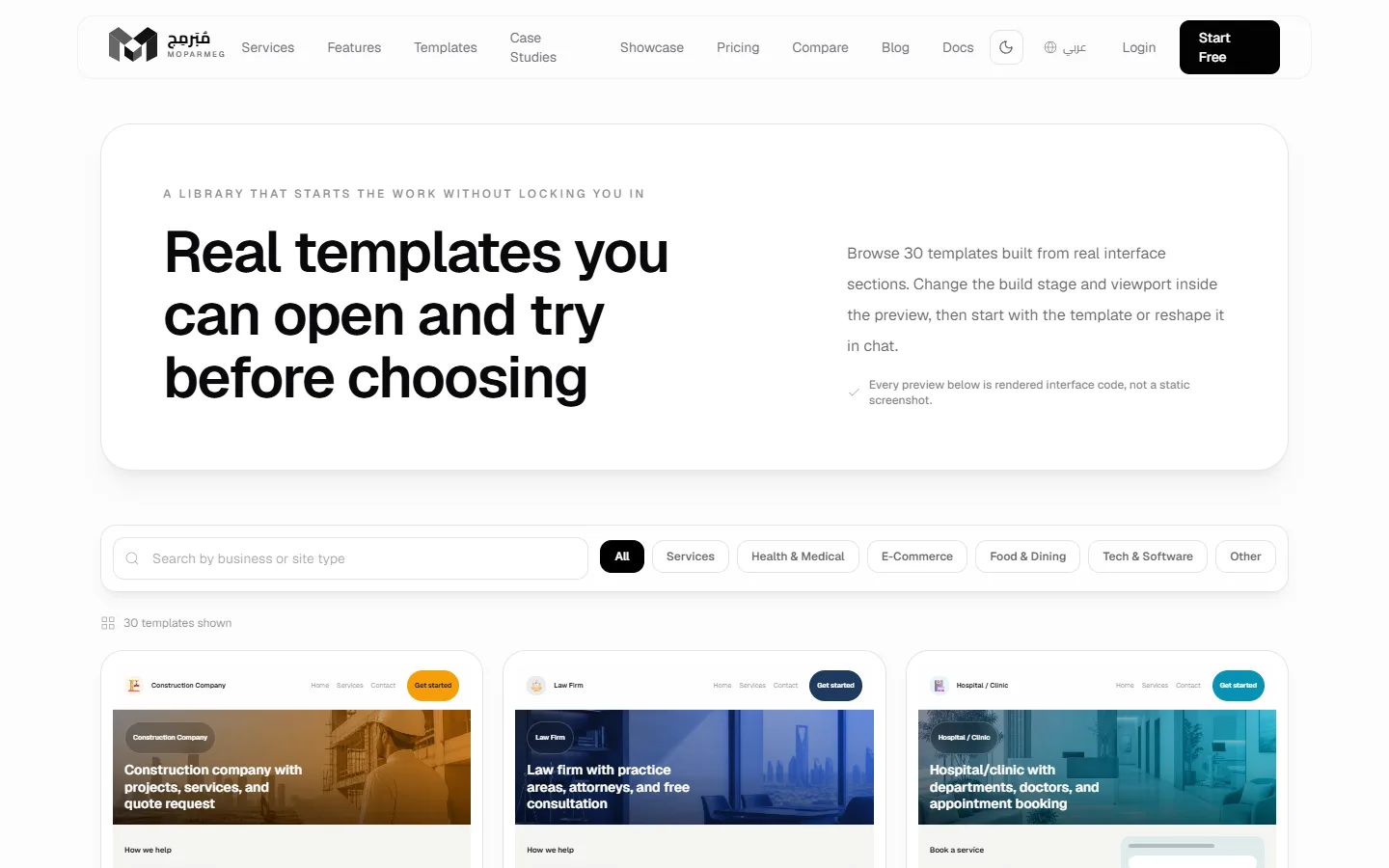
Each industry template (such as «شركة مقاولات» (Construction company) or «مكتب محاماة» (Law firm)) carries a name, a description, a colour scheme and five build stages. Each stage adds sections: «الهيكل الأساسي» (Base structure), then the industry's own sections, then contact, then «التلميع» (Polish). Templates are grouped into categories, and the gallery shows only categories that actually contain templates, such as «خدمات» (Services), «تجارة إلكترونية» (E-Commerce), «طعام ومطاعم» (Food & Dining), «صحة وطب» (Health & Medical), «تقنية وبرمجيات» (Tech & Software) and «أخرى» (Other).
From the public gallery, before signing up
- Open
/templates. The page header shows how many templates are available. - Search in «ابحث عن نشاط أو نوع موقع» (Search by business or site type), or pick a category.
- Press «فتح المعاينة» (Open preview) on a card. In the preview, switch between «سطح المكتب» (Desktop) and «الجوال» (Mobile), and choose from «مرحلة البناء» (Build stage) to see the site at each stage.
- Press «استخدم هذا القالب» (Use this template). You go to
/register?template=…. - Create and verify your account, then sign in. When the dashboard opens, the project is created from the template automatically and opened in the visual editor.
Your choice is kept in the same browser for 24 hours, so it survives opening the activation link in another tab. It is used once, at the first creation attempt, whether that attempt succeeds or fails. If it fails, picking the template again is one click away.
From inside your account
- The «القوالب» (Templates) page (
/dashboard/templates): templates grouped by category, each card with «ابدأ بهذا القالب» (Start with this template). When your quota is full the button becomes «الحصّة ممتلئة» (Quota full), and a warning links to «رقِّ باقتك» (upgrade your plan). - The «من قالب» (From a template) button on «مشاريعي» (My projects): the «مشروع جديد» (New project) dialog with the «قوالب حسب المجال» (Templates by industry) and «قوالب أساسية» (Basic templates) tabs. Details in Create a project.
What gets built
Starting from an industry template with the HTML type creates a project named after the template, with its description, containing three files: index.html, style.css and script.js. These files are the complete fifth stage, so you get the site with all its sections, not an empty skeleton. The build runs on the server straight from the section library, uses no AI requests, and the project opens in the visual editor.
What a Free plan user can do
- Create 1 project from any template, and edit its text, styles and images in the visual editor.
- Publish the site as static files at
moparmeg-ksa.com/your-site-name, with the «صُنع بمُبَرمِج» (Made with Moparmeg) badge. See Publish. - Store templates build on every plan, but taking orders through the cart needs the Commerce capability, which is paid-only. Without it the product cards show why buying is off. See Commerce.
The public gallery copy says «ثم ابدأ بالقالب أو عدّله بالمحادثة» (then start with the template or reshape it in chat), and shows a «ابدأ بدون قالب» (Start without a template) button with the line «سيبني مُبَرمِج الهيكل المناسب لمشروعك من الصفر» (Moparmeg will build the right structure from scratch). Both chat editing and building from a description are AI, which the Free plan does not include; they start with the Basic plan. See Building with AI.
FAQ
I picked a template before signing up and no project was created. Why?
Possible reasons: more than 24 hours passed, you opened the dashboard in a different browser, or your quota was full and you saw «وصلت للحد الأقصى من المشاريع في خطتك — احذف مشروعًا أو رقِّ باقتك لتبدأ من قالب» (You reached your plan's project limit — delete a project or upgrade to start from a template). Pick the template again from the «القوالب» (Templates) page.
Can I switch templates after the project is created?
A template writes the project's files once. To start from another template, create a new project within your quota.
Does a template use my AI quota?
No. Building from the section library is deterministic and calls no model.