

Email: mailboxes on your domain and sending from a verified address
Email in Mubarmij is two screens: «البريد على نطاقك» (Mail on your domain), where you connect your domain and get mailboxes on our server, and the project's «البريد» (Email) section, where you verify a sender address or domain and send from it. The section gives sender identities, not an inbox.
On this page
Who can use email
The «البريد» (Email) section requires the mailboxes capability, so it is locked on the free plan (a lock icon in the sidebar, and the server refuses with HTTP 402). Mailboxes per plan:
| Plan | Mailboxes |
|---|---|
| المجانية (Free) | 0 |
| الأساسية | 5 |
| المميزة | 5 |
| الاحترافية | 5 |
The allowance is for your whole account, not per domain: a second domain takes what is left, not new mailboxes. Once all are reserved a new domain is refused with a message asking you to upgrade or cancel an existing request.
Connect your domain to our mail
Domain ownership and records live on «البريد على نطاقك» (Mail on your domain), reached from the section's «إدارة سجلات DNS في البريد على نطاقك» (Manage DNS records) link.
- In «اربط نطاقًا» (Connect a domain) type the domain (for example
example.com) and click «اربط» (Connect). The badge shows mailboxes for the account and how many remain. - You see «أضف السجلات في لوحة نطاقك، وسنكمل الباقي» (add the records at your domain panel, we do the rest) and a card in state «بانتظار سجلاتك» (awaiting your records) with a records table and a copy button per value.
- Publish the records at your registrar, or click «انشر السجلات في منطقتي» (Publish the records to my zone) if your domain's DNS zone is with us (the button is absent without a zone), then click «افحص الآن» (Check now).
If «خدمة البريد غير مفعّلة على هذا الخادم بعد.» (the mail service is not enabled on this server yet) appears with a reason (mail host, encryption key, SPF record or provisioning tool), connecting is Not available yet on that server and Requires contacting support.
The five records
They are generated once when the task is created and stay fixed; the DKIM key is generated for your domain alone:
| Type | Name | Value | Purpose |
|---|---|---|---|
| MX | your domain | 10 then our mail host | Routes incoming mail to our servers |
| TXT | _mubarmij.your domain | mubarmij-verify= and the token | Proves ownership |
| TXT | your domain | v=spf1 include:our mail host ~all | Authorises our servers to send for you |
| TXT | mubarmij._domainkey.your domain | The public signing key | DKIM |
| TXT | _dmarc.your domain | v=DMARC1; p=none; rua=mailto:dmarc@your domain | DMARC |
Mail task stages
- «بانتظار سجلاتك» (Awaiting your records): the required records are not visible yet. Status is read from DNS every time the page opens.
- «جاهز — فريقنا يُكمل» (Ready, our team completes): the four required records are visible (MX, ownership, SPF and DKIM; DMARC is advisory).
- «جارٍ التجهيز» (Provisioning) then «يعمل» (Working): mailboxes are created.
- «تعثّر — فريقنا يعيد المحاولة» (Stalled, our team retries): the failure is on our side; you do not need to change your records.
Mailbox creation does not start automatically when the records appear: our team completes provisioning from the admin panel, and mailbox passwords are sent to you by the team («كلمات المرور وصلتك من فريقنا ولا نحتفظ بنسخة منها», passwords came from our team and we keep no copy). This step Requires contacting support.
Mail client settings
When the task is «يعمل» (Working) the card shows «صناديقك» (Your mailboxes) and their addresses, plus:
| Service | Host | Port | Security |
|---|---|---|---|
| IMAP | The mail host shown on the card | 993 | SSL/TLS |
| SMTP | The mail host shown on the card | 587 | STARTTLS |
The username is the full address.
There is no customer webmail in Mubarmij: Not available yet. Use a mail client with the IMAP and SMTP settings above.
Verify a sender address in the Email section
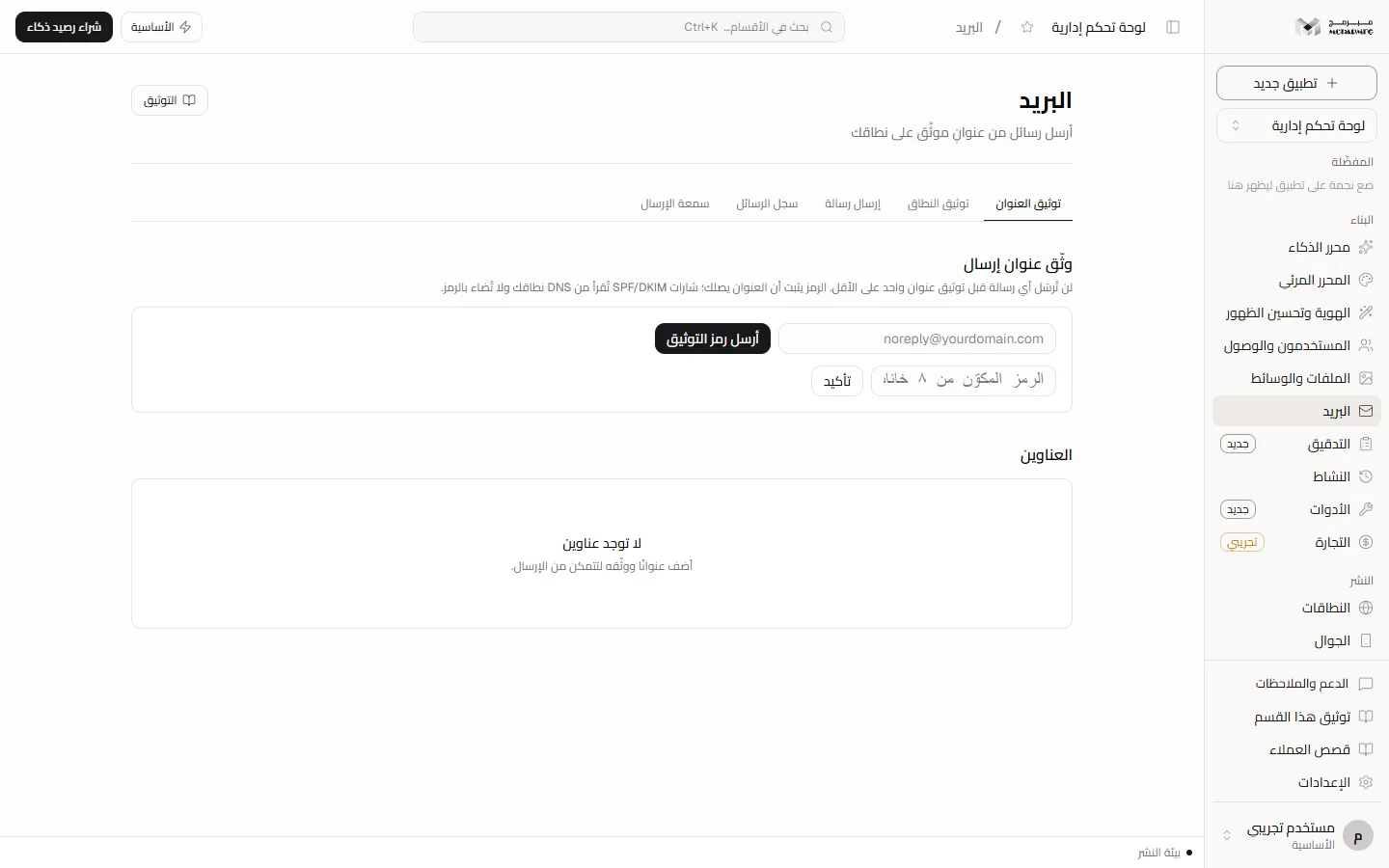
In the project open «البريد» (Email) under «البناء» (Build). The first tab is «توثيق العنوان» (Verify address):
- Type the address in «وثّق عنوان إرسال» (Verify a sender address) and click «أرسل رمز التوثيق» (Send verification code). An 8-character code arrives at that address.
- Enter it in «الرمز المكوّن من ٨ خانات» (8-character code) and click «تأكيد» (Confirm). You see «وُثّق العنوان» (Address verified).
The «العناوين» (Addresses) panel lists each address as «موثّق» (Verified) or «بانتظار التوثيق» (Awaiting verification) with SPF, DKIM and DMARC badges. The code only proves the address reaches you; the badges come from the address domain's DNS, not from the code. If the code cannot be sent you see «تعذّر إرسال رسالة التوثيق — تحقّق من إعداد الخادم» (could not send the verification email, check server setup).
Verify a whole domain
- Connect the domain first on «البريد على نطاقك» and publish its records.
- In the «توثيق النطاق» (Verify domain) tab type the domain in «أضف نطاقًا هويّةَ إرسال» (Add a domain as a sender identity) and click «إضافة» (Add). Without an existing mail task it is refused, telling you to connect it on «البريد على نطاقك» first.
- Click «افحص الآن» (Check now). The «الملكية» (Ownership), SPF, DKIM and DMARC badges light up from DNS, with a «مهمّة البريد: …» (Mail task) line and the last check time.
Once verified you can send from any address on that domain.
Sending, history and reputation
- In «إرسال رسالة» (Send message) leave «من (اختياري)» (From, optional) empty to use the first verified address, or type an address on a verified domain.
- Fill «إلى» (To), «الموضوع» (Subject) and the body, then click «إرسال» (Send).
The button is disabled until you verify an address or a domain. An address on an added but unverified domain is refused with the domain's reason. «سجل الرسائل» (Message history) shows «الرسائل الصادرة» (Outgoing messages) and any failure reason; replies go to the address's mailbox, not here. «سمعة الإرسال» (Sending reputation) shows «أُرسلت» (Sent), «فشلت» (Failed), «نسبة الوصول» (Delivery rate) and «عناوين موثّقة» (Verified addresses), plus SPF, DKIM and DMARC as «مضبوط» (Set) or «غير مضبوط» (Not set).