

Building with AI
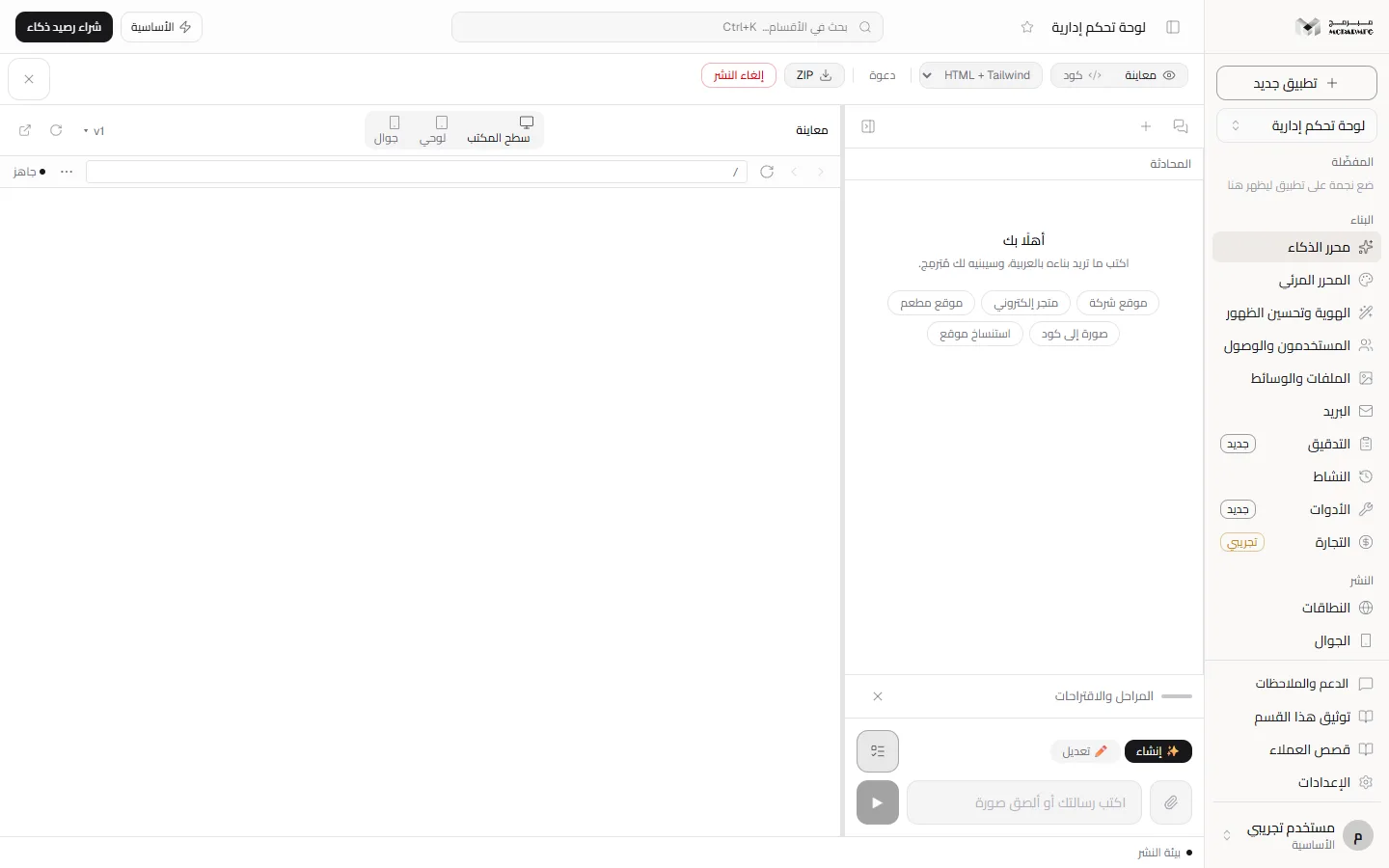
The «محرر الذكاء» (AI editor) section of the project workspace
«محرر الذكاء» (AI editor) is your project's main page: you build by chat and watch the result live. The section needs the AI capability from your plan, so it shows as locked on the free plan.
On this page
Where to find it
The first entry of the «البناء» (Build) group in the sidebar is «محرر الذكاء» (AI editor), subtitled «ابْنِ تطبيقك بالمحادثة، وشاهد النتيجة مباشرة» (Build your app by chat and see the result live). It opens /projects/[id] itself — what you see when you open the project.
What is on the screen
- Chat panel: its header has the icons «المحادثات» (Conversations), «محادثة جديدة» (New conversation) and «طيّ المحادثة» (Collapse chat), plus the «متبقي» (remaining) request count. Messages sit below, then the input box.
- View panel: the «معاينة» (Preview) and «كود» (Code) buttons switch between the live preview and reading the project files.
- Handle between the panels: drag it to change the chat width.
- Header: «فتح المحادثة» (Open chat) when the chat is collapsed, the project technology menu (changing it converts the whole project after a confirmation and a restore point; its options follow your plan), collaborator avatars (inviting new members from them is for the project owner and collaborators with the admin role), «ZIP» to download the project, and «نشر» (Publish) or «إلغاء النشر» (Unpublish), which collaborators do not see.
- Read-only access: a collaborator with read-only access sees a bar under the header: «وضع المشاهدة — صلاحيتك في هذا المشروع للقراءة فقط، والتعديلات هنا لا تُحفظ.» (View mode — your access to this project is read-only, and edits here are not saved).
- On a phone: one surface at a time — chat or view — with a bottom bar to switch.
The lock on the free plan
The section requires the «الذكاء الاصطناعي» (AI) capability. On the «المجانية» (Free) plan the sidebar shows a lock beside it labelled «متاح في الباقات المدفوعة» (Available on paid plans), and hovering shows the reason. The page itself still opens: you see the preview and the code, but the input box is replaced by a message and two buttons, «رقِّ باقتك لتفعيل الذكاء الاصطناعي» (Upgrade to enable AI) and «افتح المحرّر المرئي» (Open the visual editor). Paid daily quotas start at 50 requests on «الأساسية» (Basic). A collaborator on a project someone else owns sees, whatever their plan, the message «توليد الذكاء الاصطناعي في هذا المشروع لمالكه وحده…» (AI generation in this project is for its owner only…) in place of the box, with «افتح المحرّر المرئي» (Open the visual editor) and no upgrade button.
Where to go next
- How the AI builds and what counts: Building with AI.
- The input box, attachments and instructions while it works: Chat.
- View sizes and preview tools: Preview.
- Editing by clicking, without AI: Visual editor.