

Building with AI
Live preview — view sizes and preview tools
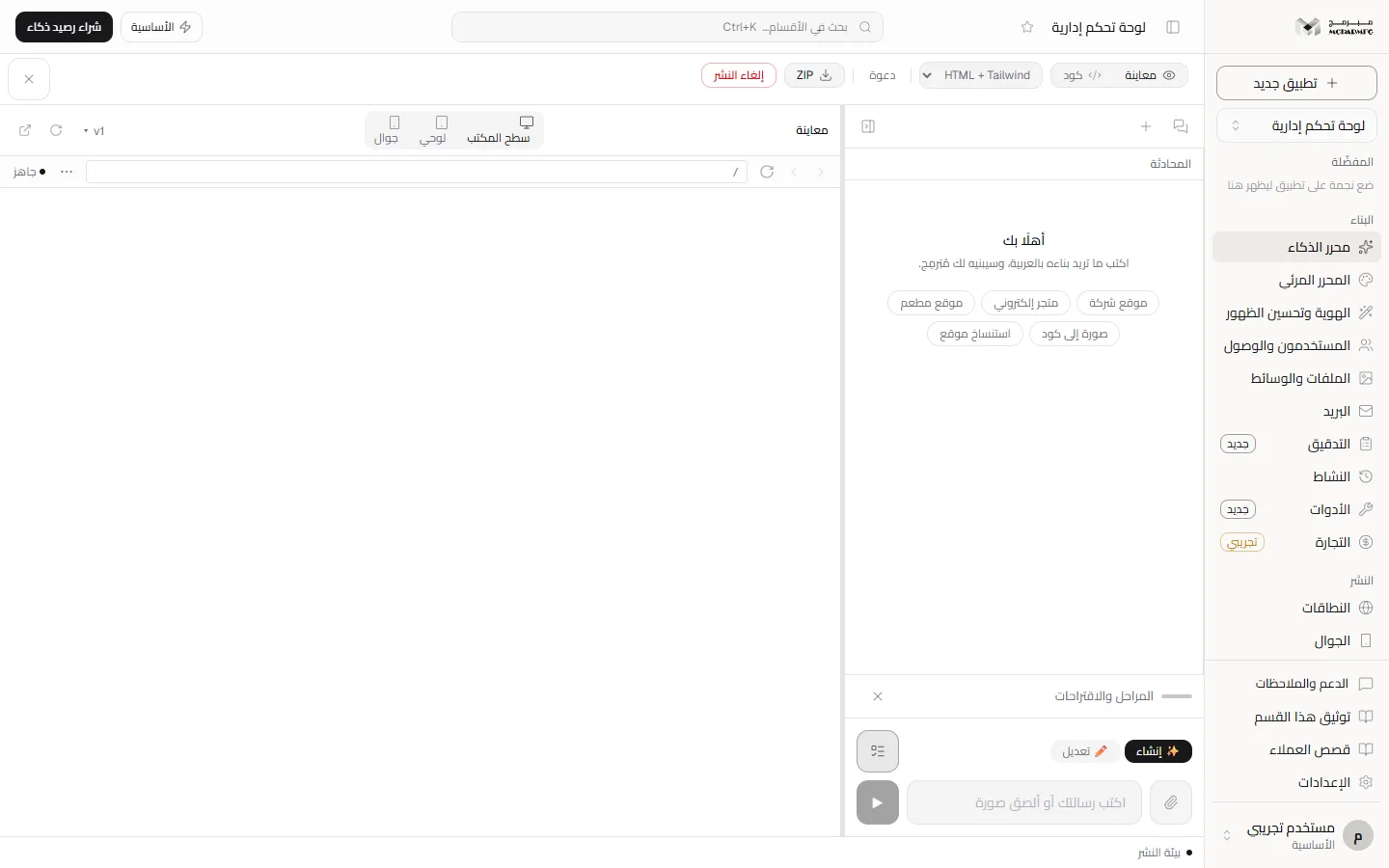
The preview shows your project while it is built and edited, in an isolated frame beside the chat. Switch between three view sizes, move between pages, preview an earlier version, and open the saved revision in its own tab.
On this page
Opening the preview
In «محرر الذكاء» (AI editor) the view panel switches between «معاينة» (Preview) and «كود» (Code) from the header. The preview header reads «معاينة» (Preview) and shows «AI يبني...» (AI is building...) while an AI request is running. The preview shows what is in the editor right now, including edits not yet saved.
The three view sizes
| Button | Width |
|---|---|
| «سطح المكتب» (Desktop) | The full width of the preview panel |
| «لوحي» (Tablet) | 768 px |
| «جوال» (Phone) | 375 px |
Switching changes the frame width immediately, with no rebuild. On narrow screens only the icons show, without their names.
A responsive lab with a list of real devices, a custom size and Tailwind breakpoints is «Not available yet»: its component exists in the code but is not rendered in the preview, so only the three sizes above are available today.
Preview header tools
- «النسخ» (Versions): preview an earlier version of the project inside the frame before deciding to restore it. With no versions you see «لا توجد نسخ محفوظة بعد.» (No saved versions yet).
- «تحديث المعاينة» (Refresh preview): redraws the frame.
- «فتح في تبويب جديد» (Open in a new tab): opens the revision saved on the server through a short-lived link, not the unsaved edits in the editor. If the link cannot be created it opens what is in the editor.
Navigation bar
When the project has pages, a bar under the header offers «رجوع» (Back), «تقدّم» (Forward) and «تحديث المعاينة» (Refresh preview), the current page path, and an «اذهب إلى صفحة» (Go to page) menu when there is more than one page. «أدوات إضافية» (More tools) opens «التقاط صورة» (Take screenshot), «تسجيل المعاينة» (Record preview) and «تعليق ورسم» (Comment and draw). The end of the bar shows «يبني» (Building) or «جاهز» (Ready).
Errors
- «⚠ خطأ:» (Error): an error from the project's code, with a «⚡ إصلاح بالـ AI» (Fix with AI) button that sends the error text as an AI request, so it counts against your quota and does not work on the free plan.
- «ℹ قيد بيئة المعاينة:» (Preview environment limit): not a bug in your project. The preview runs in an isolated frame that does not share the platform's origin, so some ordinary browser APIs throw inside it. No fix button is offered because a code change cannot solve it.
- A project that needs a runtime: projects such as Next.js are not rendered directly; a card explains that «المعاينة تحتاج بيئة تشغيل» (the preview needs a runtime environment).
The preview inside the visual editor
In the visual editor the preview header becomes «تحرير الصفحة» (Edit page), and zoom from 10% to 300%, the page buttons and «إضافة قسم» (Add section) are added below it. The same three view sizes are available there.
FAQ
Is the preview the published site itself?
Not exactly. The preview shows what is in the editor now, including unsaved edits. The closest thing to the saved revision is «فتح في تبويب جديد» (Open in a new tab); publishing itself is covered in Publish.
Why can't I find a specific iPhone or iPad size?
Because only three sizes are available today: desktop, 768 and 375 px. The device list is not yet wired to the preview.
I got «قيد بيئة المعاينة» (Preview environment limit) — is my project broken?
Usually not. These are limits of the isolated frame, and the same code may work on the published site.