

Building with AI
The Initiatives (roadmap) section — planning and one-click building
The «خارطة الطريق» (Roadmap) section, titled «المبادرات» (Initiatives), organises your app's work into initiatives, each with milestones. Every milestone carries a prompt, and pressing «ابْنِه» (Build it) opens the editor with that prompt placed in the chat box for you to review and send yourself.
On this page
Open the section from the sidebar as «خارطة الطريق» (Roadmap). The page title is «المبادرات» (Initiatives) and its subtitle «خطّط المراحل القادمة، وابْنِ أيًّا منها بضغطة واحدة» (Plan the next phases, and build any of them in one click).
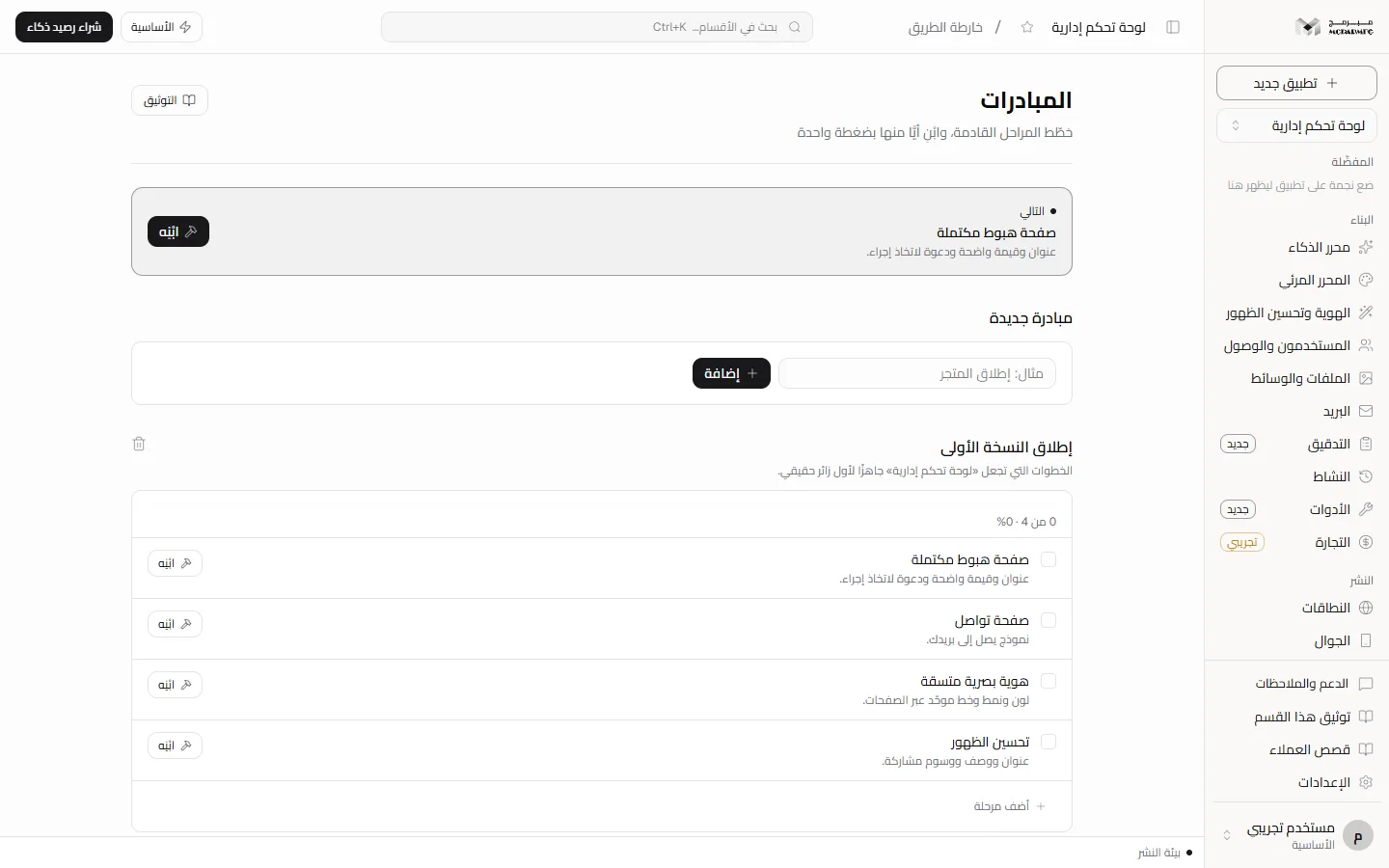
The starter plan for a new project
The first time you open the section for a project with no initiatives, a two-initiative plan is created:
- «إطلاق النسخة الأولى» (Launch the first version): «صفحة هبوط مكتملة» (Complete landing page), «صفحة تواصل» (Contact page), «هوية بصرية متسقة» (Consistent visual identity), «تحسين الظهور» (Improve discoverability).
- «تحويل الزائر إلى عميل» (Turn visitors into customers): «آراء العملاء» (Testimonials), «أسئلة شائعة» (FAQ), «عرض الأسعار» (Pricing).
This plan is the same fixed text for every project (with your project name in the description); it is not generated by AI from your app's content.
The «التالي» card and the «ابْنِه» button
At the top is the «التالي» (Up next) card: the first unfinished milestone in the first initiative that still has one.
- Press «ابْنِه» (Build it) on the Up next card or next to any unfinished milestone.
- You are taken to the project editor with the milestone's prompt placed in the chat box. It is not sent automatically.
- Review and edit the wording if you like, then send it. Building happens in the chat and uses your daily AI quota.
- Return to «المبادرات» and mark the milestone done yourself.
A milestone is not marked done automatically after a successful build; linking the build result to the milestone state is Not available yet. If session storage is disabled in your browser, the editor opens without the prefilled prompt.
Adding an initiative and a milestone
- In the «مبادرة جديدة» (New initiative) panel type a title (placeholder «مثال: إطلاق المتجر», e.g. launch the store) and press «إضافة» (Add); «أُضيفت المبادرة» (Initiative added) appears. An empty title is refused with «عنوان المبادرة مطلوب» (Initiative title is required).
- A new initiative has no milestones. Press «أضف مرحلة» (Add milestone) under it.
- Type into «ماذا تريد أن يُبنى؟» (What do you want built?) and press «إضافة» (Add), or «إلغاء» (Cancel). What you type becomes both the milestone title and its prompt, so write it the way you want to send it to the agent.
Completion, progress and deletion
- Press the checkbox next to a milestone to mark or unmark it done; its title is struck through and its «ابْنِه» button disappears.
- Under each initiative title is a progress bar and text such as «2 من 4 · 50%» (2 of 4 · 50%).
- When every milestone is done the initiative carries the «مكتملة» (Completed) badge; unmarking any milestone puts it back in progress.
- The trash icon next to an initiative title deletes it immediately, with no confirmation dialog.
A collaborator with the «مشاهد» (Viewer) role sees the initiatives and their milestones, but adding, marking done and deleting are refused with «صلاحيتك في هذا المشروع للمشاهدة فقط» (Your access to this project is view-only); the «محرر» (Editor) and «مدير» (Admin) roles change them like the owner.
Plans and locking
The «خارطة الطريق» section requires the AI capability. On the «المجانية» (Free) plan the AI quota is 0 requests a day, so the section shows as locked and the server answers 402 with PLAN_CAPABILITY_REQUIRED and the text «الذكاء الاصطناعي متاح في الباقات المدفوعة فقط — خطة المجانية تشمل القوالب الجاهزة والمحرّر المرئي.» (AI is available on paid plans only; the المجانية plan includes ready templates and the visual editor).
- «الأساسية» (Basic): 50 AI requests a day.
- «المميزة» (Premium): 200 AI requests a day.
- «الاحترافية» (Professional): 1000 AI requests a day.
The build request in the chat is itself refused with status 402 and code AI_PAID_ONLY on the free plan, and with status 429 and code AI_RATE_LIMITED once the daily quota is used up. Upgrade from Billing.
If you are a collaborator on someone else's project, the section lock follows the project owner's plan, not yours. Sending a build request from the chat of a project you do not own is Not available yet: the server answers «المشروع غير موجود» (Project not found).
FAQ
I deleted every initiative — why did the starter plan come back?
Because the plan is created whenever the section opens for a project with no initiatives at all. Keep at least one initiative if you do not want it back.
Can I edit an existing milestone's title?
Not from this page; it lets you add, mark done, and delete at the initiative level only.