

Publishing and domains
Publish a project to a public address in Moparmeg
Publishing takes a snapshot of your project's files as you saved them and serves it at a public address. After that, the live site does not change when you edit or when the editor autosaves; it changes only when you publish again. The current route publishes static files only: HTML, CSS, JavaScript, images and fonts.
On this page
Publishing, step by step
- Open your project in the visual editor or the code editor.
- Press «نشر» (Publish) in the top bar. The editor saves the visible version first; if some edits still need review, it stops here.
- The saved version is sent to the server, which checks it as described in the next section.
- If the publish succeeds, the button becomes «إلغاء النشر» (Unpublish), and a «تم نشر مشروعك!» (Your project is published!) notification gives you the address.
Publishing and unpublishing belong to the project owner alone: a collaborator, whatever their role, does not see the «نشر» (Publish) button, and a request sent directly is answered «المشروع غير موجود» (Project not found).
If you edit something while publishing, you see: «تم نشر النسخة التي حفظتها، لكن لديك تعديلات أحدث لم تدخل في هذا النشر بعد.» (The version you saved was published, but you have newer edits that are not in this publish yet.) Press «إلغاء النشر» (Unpublish) and then «نشر» (Publish) again to include them.
What is checked before publishing
| Check | Message when refused |
|---|---|
| More than 10 publish actions in a minute | «كثرة الطلبات، حاول لاحقاً» (Too many requests, try later) |
No saved version sent (PUBLISH_REVISION_REQUIRED) | «احفظ النسخة الظاهرة أولًا ثم أعد النشر.» (Save the visible version first, then publish again.) |
Files changed between save and publish (PUBLISH_REVISION_CONFLICT) | «تغيّرت نسخة المشروع قبل النشر. حدّث الصفحة وراجع التغييرات ثم أعد المحاولة.» (The project changed before publishing. Refresh, review the changes and try again.) |
| Content moderation | «تم رفض النشر: …» (Publish refused: …) with the reason |
A file that cannot be served statically (PUBLISH_NOT_STATIC) | The file name and the reason, e.g. «server.js: خادم يحتاج عملية تعمل — خطة المجانية تخدم ملفات ثابتة فقط.» (server.js: a server that needs a running process — the Free plan serves static files only.) |
The address was taken at the same moment (PUBLISH_ADDRESS_TAKEN) | «هذا العنوان حُجز للتو. أعد المحاولة.» (This address was just taken. Try again.) |
Accepted and refused files
Accepted: whatever a browser can display directly, meaning .html, .css, .js, images (.png, .jpg, .webp, .svg…), fonts, .json, .xml and .txt. At least one HTML page is required, and index.html is the entry page when present.
Refused, with the file named: server files (.php, .py, .sh…), package.json, Next, Vite and Webpack configs, server.js, .env files, files that need a build step (.ts, .tsx, .jsx, .vue, .svelte), prisma/schema.prisma, and Dockerfile.
Not available yet: publishing sites that need a server runtime (React, Next.js, PHP) from the «نشر» (Publish) button, on any plan. The check above refuses their files even on paid plans, and the interface has no step for provisioning a runtime container. The Basic, Premium, Professional plans include hosting in their contract, but running such a site on the platform's own hosting requires contacting support. To run it on your own server, use «تصدير إلى GitHub» (Export to GitHub) or «تنزيل حزمة Docker» (Download Docker package) in the «التصدير» (Export) tab of project settings, which only the project owner sees.
The site address
The site is published at moparmeg-ksa.com/site-name, showing your site alone, without the platform's interface. A site name starts with an English letter; contains lowercase English letters, digits and single hyphens; is 3 to 40 characters long; and is not a name the platform uses (such as login or pricing).
- On the first publish, if the project's slug is not a valid address (for example because it is Arabic), an address is generated from the English letters in the project title plus six random characters. If the title has no English letters, the address is
site-followed by six characters. - A project already published with an invalid slug keeps it, so its links do not break, and stays reachable at
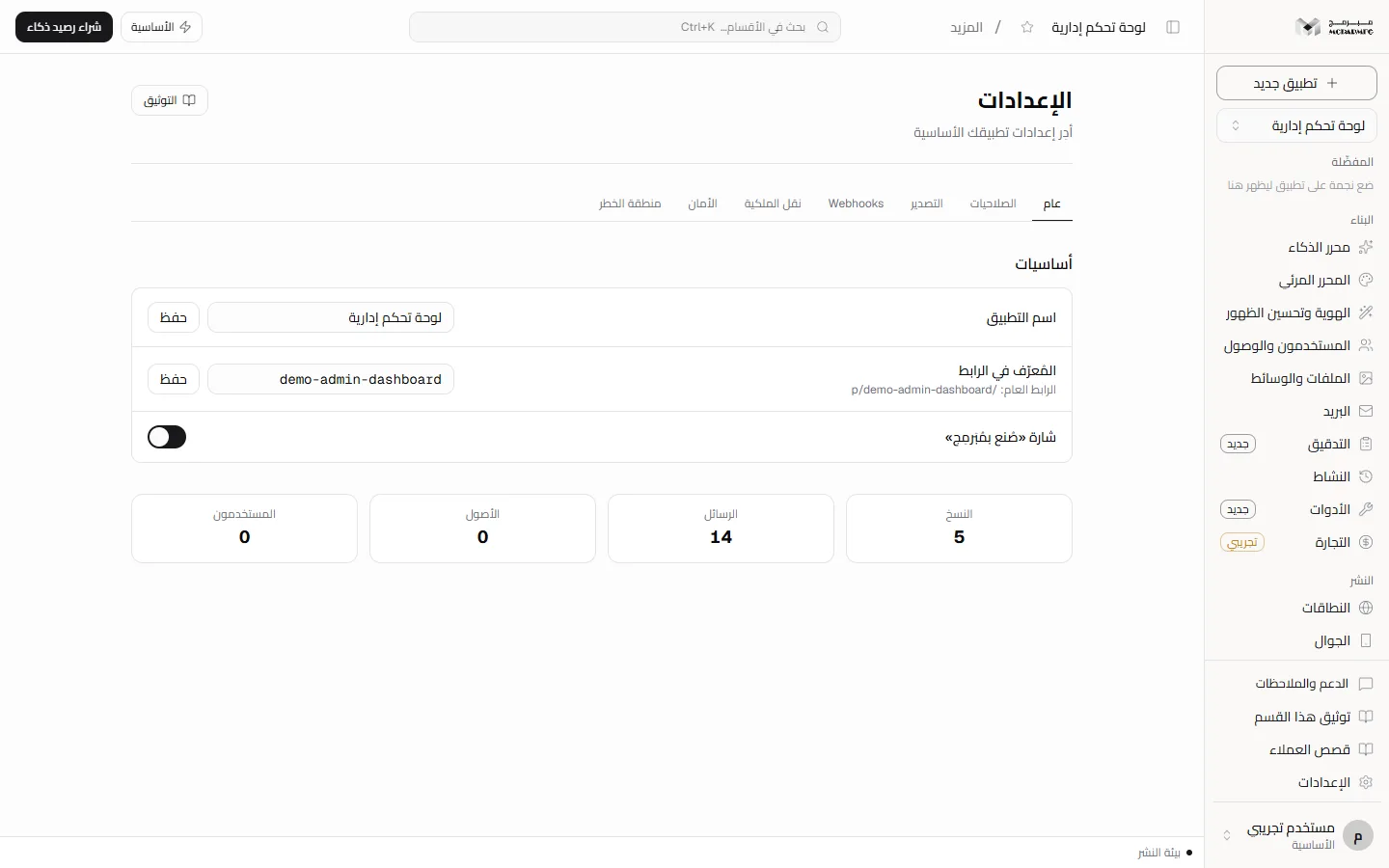
/p/slug. The notification then suggests choosing a name in English letters. - Change the slug in project settings, field «المُعرّف في الرابط» (Identifier in the link). Old links stop working after the change.
- Subdomains and custom domains are in Domains. Custom domains per plan: Free 0, Basic 1, Premium 5, Professional 5.
The «صُنع بمُبَرمِج» (Made with Moparmeg) badge
The badge appears in a corner of every published site unless your plan includes the hide-badge capability and you choose to hide it. The «إظهار الشارة» (Show badge) switch is in project settings under «شارة «صُنع بمُبَرمِج»» (The Made with Moparmeg badge), and on the Branding page. On the Free plan hiding it is refused with «إخفاء الشارة متاح في الباقات المدفوعة فقط — خطة المجانية تشمل القوالب الجاهزة والمحرّر المرئي.» (Hiding the badge is available on paid plans only — the Free plan includes ready templates and the visual editor.)
Unpublishing and plan changes
«إلغاء النشر» (Unpublish) turns the project back into a private draft, and its address answers «لا يوجد موقع بهذا العنوان.» (No site at this address.) Whenever the site is served, its files are checked again against your current plan: a site with non-static files stops showing if the plan becomes Free.
For API users: the old route /api/projects/<id>/deploy is retired and answers 410 with code DEPLOY_RETIRED. Publish through /api/projects/<id>/publish from a signed-in session, or through POST /api/v1/projects/<id>/publish with an API key that carries the «نشر المشاريع وإلغاء نشرها» (Publish and unpublish projects) scope. That scope is not among the default scopes, so it has to be chosen on purpose when the key is created. Both routes run the same checks listed above; see the API.
FAQ
I edited the site and the public address did not change.
The address serves the last version you published, not the last one you saved. Publish again.
Why was my React project refused when my plan is paid?
Because the publish route accepts static files only, on every plan. To run it on your own server, export it from the «التصدير» (Export) tab in project settings, or contact support to run it on the platform's hosting.
Can I choose the site name before the first publish?
Yes, in the «المُعرّف في الرابط» (Identifier in the link) field in project settings. If it is a valid address, it is used as is.