

Workspace sections
Version history in Mubarmij — saving and restoring
Each version is a full snapshot of your project files at one moment. You save them yourself before a big change, and Mubarmij saves some automatically before operations that replace your files. Restoring never erases your current state: it is saved first as a new version.
On this page
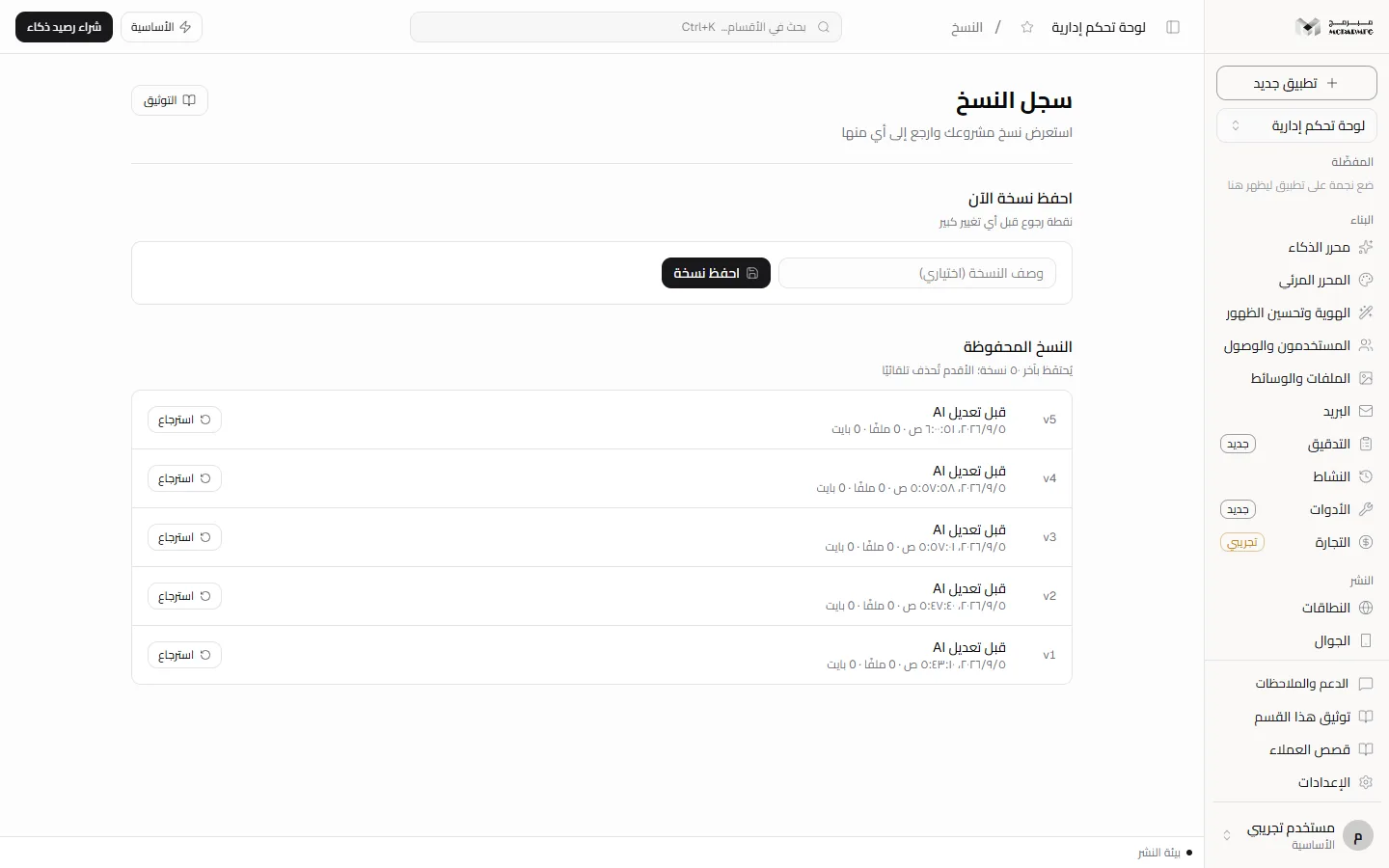
Where to find the section
In the project workspace sidebar, under the «متقدّم» (Advanced) group, click «النسخ» (Versions). The page is titled «سجل النسخ» (Version history) and has two panels: «احفظ نسخة الآن» (Save a version now) and «النسخ المحفوظة» (Saved versions). The section is available on every plan, with no lock.
A collaborator who accepted the project invitation sees the list with any role. Saving and restoring need the «محرر» (Editor) or «مدير» (Admin) role; a «مشاهد» (Viewer) is refused with «صلاحيتك في هذا المشروع للمشاهدة فقط» (Your access to this project is view-only).
Saving a version manually
- In «احفظ نسخة الآن» (Save a version now), type a description in «وصف النسخة (اختياري)» (Version description, optional), for example "before changing the home page".
- Click «احفظ نسخة» (Save version).
- The message «حُفظت النسخة» (Version saved) appears, the version is added at the top of «النسخ المحفوظة» (Saved versions), and the description field is cleared.
A version stores the project files as they are saved on the server at that moment, not unsaved text in an editor window. A version without a description is shown as «نسخة بلا وصف» (Version without description). Saving is limited to twenty versions per minute per user. After that the server answers «كثرة الطلبات» (Too many requests).
You can also list versions and save one for your own projects with an API key through /api/v1/projects/<id>/versions: reading needs the projects:read scope and saving needs projects:write, with the same logic and limit. Restoring is not available with a key; it happens on this page only. Details in the API.
Versions created automatically
Before any operation that replaces your files, Mubarmij saves the previous state with a fixed description:
- «تلقائي: قبل الاستعادة» (Automatic: before restore) — on every restore from this page.
- «قبل تعديل مرئي» (Before a visual edit) — when saving edits from the visual editor, and «قبل مزامنة تعديل مرئي إلى Next.js» (Before syncing a visual edit to Next.js) for Next.js projects.
- «قبل التحويل إلى …» (Before converting to …) and «قبل إنشاء نسخة المحرر المرئي» (Before creating the visual editor copy) — before converting the project framework.
- «قبل استنساخ الموقع» (Before cloning the site) — before cloning a site from a URL.
- A version named "plan title — milestone title" after each milestone completes in AI build.
Versions that come from AI (milestone builds and site cloning) only appear on paid plans, because AI is paid-only; the «المجانية» (Free) plan is answered with HTTP 402 (AI_PAID_ONLY).
Publishing does not create a version in this history.
Reading the list
Each row shows a number such as v12 (the newest has the highest number), the description, date and time, file count, and size. Size is computed from the length of file contents, so it is approximate. With no versions you see «لا توجد نسخ» (No versions).
The panel description says «يُحتفَظ بآخر ٥٠ نسخة؛ الأقدم تُحذف تلقائيًا» (The last 50 versions are kept; older ones are deleted automatically), and that limit includes automatic versions. A long visual-editor session can push old manual versions out of the list. Numbers are computed from the current list, so a version's number changes when older ones are deleted.
Restoring a version
- Click «استرجاع» (Restore) beside the version. There is no confirmation dialog; it starts immediately.
- The page reads the current project files to confirm they are still what you see.
- The server replaces the files with the version's files and, in the same step, saves your previous state as «تلقائي: قبل الاستعادة» (Automatic: before restore).
- The message «استُرجعت النسخة — حالتك السابقة حُفظت كنسخة جديدة» (Version restored — your previous state was saved as a new version) appears.
A restore can therefore be undone: restore the «تلقائي: قبل الاستعادة» version.
When a restore fails
- «تعذّر قراءة النسخة الحالية قبل الاسترجاع — حدّث الصفحة وأعد المحاولة» (Could not read the current version before restoring — refresh and retry): the page could not read your current files, so no request was sent.
- «تغيّرت نسخة المشروع في نافذة أخرى. حمّل أحدث نسخة ثم أعد الاستعادة.» (The project changed in another window. Load the latest version and restore again.): something was saved elsewhere after the files were read. Nothing is written, so that save is not erased.
- «هذه النسخة التاريخية تالفة ولا يمكن استعادتها بأمان.» (This historical version is corrupt and cannot be restored safely.): its files fail today's validation and are refused before touching your project.
- «النسخة غير موجودة» (Version not found): it was deleted, usually by the 50-version limit.
Versions and the published site
Your public address does not serve the editor's files. It serves the snapshot saved at your last successful publish. Therefore:
- Restoring changes the workspace files only. The published site does not change until you publish again.
- The list does not mark which version is published. To return to exactly what you published, save a clearly described version before publishing.
FAQ
Does restoring delete newer versions?
No. All versions stay, and an «تلقائي: قبل الاستعادة» (Automatic: before restore) version is added. The only deletion is of the oldest versions beyond fifty.
Does the version limit differ by plan?
No. It is 50 versions per project on every plan.
Can I preview a version's content before restoring?
The «سجل النسخ» (Version history) page does not show version content, only description, date, file count and size. Through the API, requesting the list with ?versionId= returns one version with its files without restoring it.