

Checks and quality
The audit section in Mubarmij — categories and scores
Each audit here is a deterministic check that reads your saved project files and looks for specific patterns. AI is not consulted, so the same result repeats on every run, and the section works on every plan without using any quota.
On this page
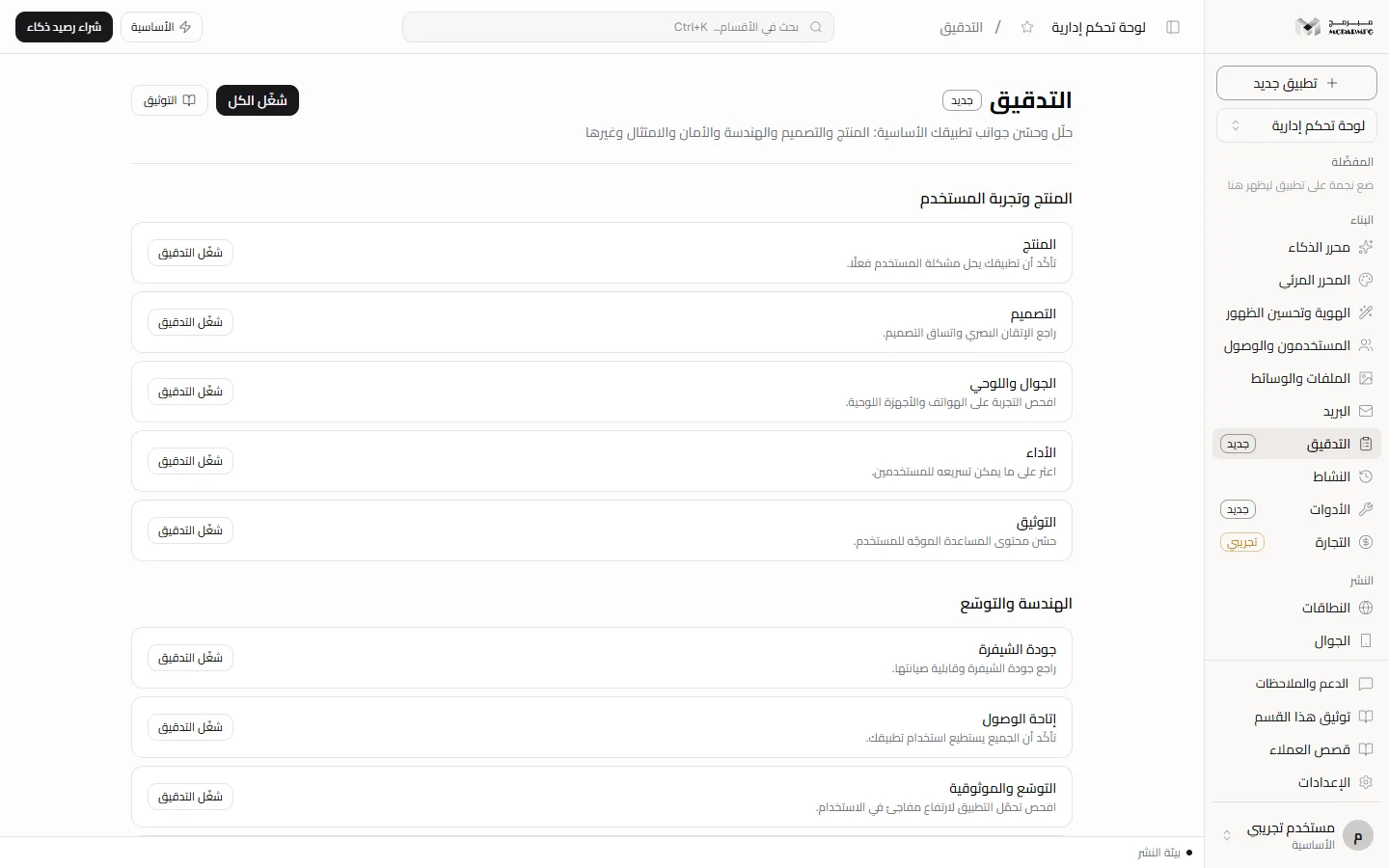
Groups and audits
Open «التدقيق» (Audit) from the «البناء» (Build) group in the sidebar (it carries the «جديد» (New) badge). The page shows five groups:
- «المنتج وتجربة المستخدم» (Product and UX): «المنتج» (Product), «التصميم» (Design), «الجوال واللوحي» (Mobile and tablet), «الأداء» (Performance), «التوثيق» (Documentation).
- «الهندسة والتوسّع» (Engineering and scale): «جودة الشيفرة» (Code quality), «إتاحة الوصول» (Accessibility), «التوسّع والموثوقية» (Scalability and reliability), «معالجة الأخطاء» (Error handling), «قاعدة البيانات» (Database), «تغطية الاختبارات» (Test coverage), «التكاملات» (Integrations), «سحابة مُبَرمِج» (Mubarmij cloud).
- «الأمان والوصول» (Security and access): «الأمان» (Security), «الهوية والصلاحيات» (Identity and permissions), «الاعتماديات وسلسلة التوريد» (Dependencies and supply chain).
- «التسويق والإيرادات» (Marketing and revenue): «تحسين الظهور» (SEO), «صفحة الهبوط» (Landing page), «النصوص والمحتوى» (Copy and content), «الهوية البصرية» (Visual identity), «التدويل» (Internationalisation), «الفوترة والضريبة» (Billing and tax).
- «القانون والامتثال» (Legal and compliance): «القانوني» (Legal), «الخصوصية» (Privacy).
Running one audit
- On an audit card, click «شغّل التدقيق» (Run audit).
- When it finishes, the card expands to show findings and the button becomes «أعد التدقيق» (Re-run audit).
- The result summary replaces the audit description, for example «ملاحظات على تجربة الجوال (2)» (Mobile experience notes (2)), and the score appears beside it.
- Click the card title to collapse or expand it. Before the first run nothing opens.
Run all
«شغّل الكل» (Run all) at the top runs the twenty-four audits one after another; you see each card work in turn. At the end you get «اكتملت كل التدقيقات» (All audits completed), or a message such as «تعذّر 2 من 24 تدقيقًا: …» (2 of 24 audits failed: …) naming what failed.
What an audit reads
An audit reads the saved project files (not the published site), the project name, description and status, and counts from other sections: app users, secrets, domains, browser tests, products and versions. For example, «التوسّع والموثوقية» (Scalability and reliability) notes «لا توجد نسخ محفوظة» (No saved versions) when version history is empty, and «تغطية الاختبارات» (Test coverage) counts browser tests.
The audit is a static text-pattern check, not a human review and not an AI analysis. It can miss a defect that matches no pattern, and it can flag text that matches a pattern while being fine. Treat each finding as a lead to verify in the named file.
How the score is computed
The score starts at 100 and loses 25 per «عالٍ» (High) finding, 12 per «متوسط» (Medium) and 5 per «منخفض» (Low), never below zero. With no findings you see «لا ملاحظات» (No findings) marked «سليم» (OK) and a score of 100. The score is green from 80, accent-coloured from 50, and red below. Each finding shows severity, title, explanation, and the file name when known.
When an audit fails
If an error happens during a run, the run is recorded as failed rather than left running, and the error message appears. Because the failed run becomes the latest, the card falls back to its original description with no score, even if an earlier run succeeded. Re-run after making sure the project files are saved.
Plans and AI
The section is not locked on any plan. It works on «المجانية» (Free) as on the others and uses none of the daily AI quota. Fixing findings through chat needs the AI editor, which is paid-only. A collaborator with the «مشاهد» (Viewer) role sees the latest results; running an audit needs the «محرر» (Editor) or «مدير» (Admin) role. See also Security, Performance and SEO.
FAQ
Does the audit fix findings automatically?
No. It reads and reports only; it does not change your files.
Do I need to publish before auditing?
No. It reads the files saved in the workspace.
Does the audit show who did what in the project?
No. The audit checks project files. Invitations, joins and role changes are in the Activity section.