

Workspace sections
Secrets: storing app keys encrypted
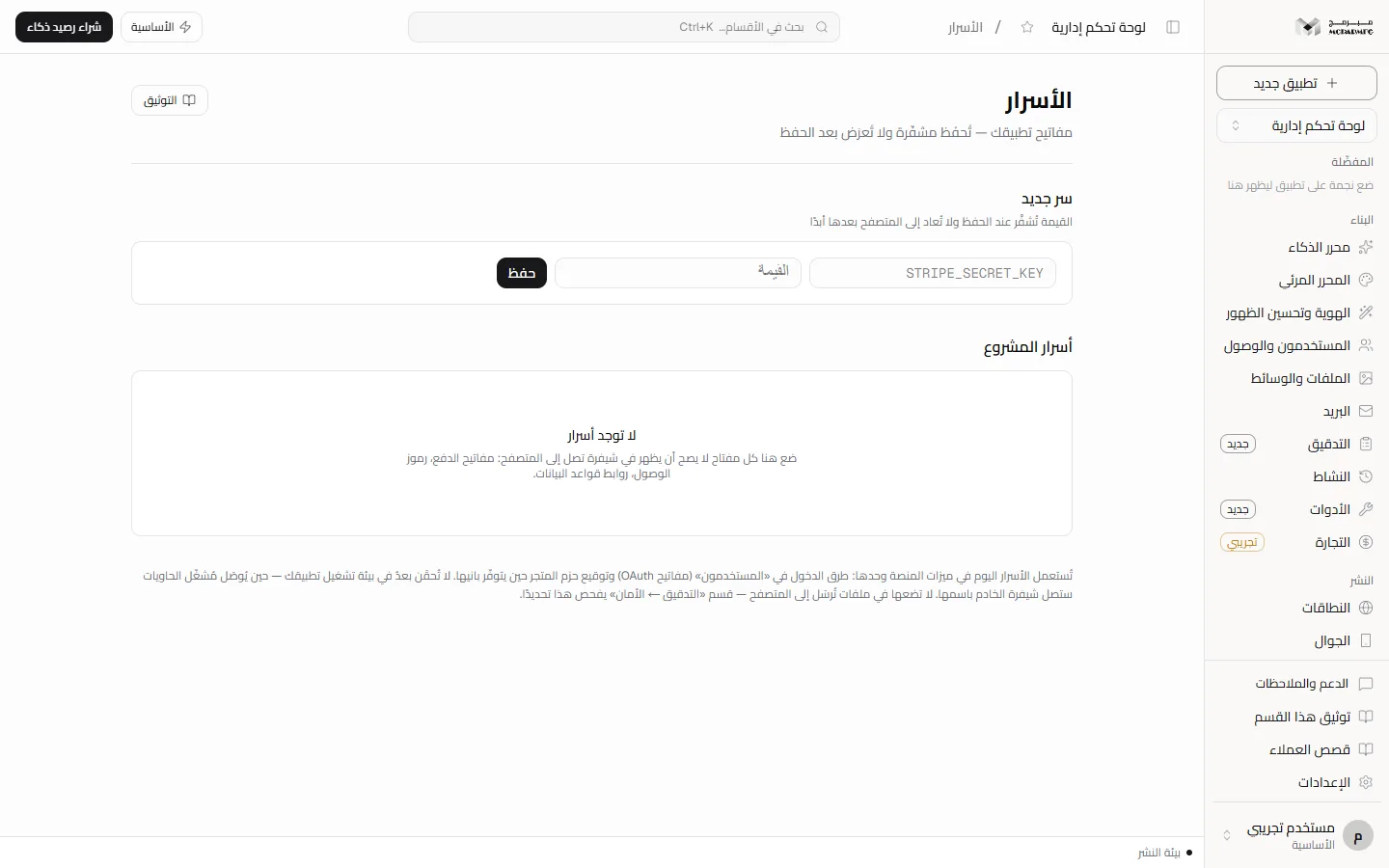
The «الأسرار» (Secrets) section is where keys go that must never appear in code sent to the browser: payment keys, access tokens, database URLs. The value is encrypted on save and never returned to the browser again, not even to you.
On this page
Access and plans
Open «الأسرار» (Secrets) under «متقدّم» (Advanced). The section needs hosting: it is locked on المجانية (Free) and available on الأساسية, المميزة, الاحترافية. Requests from a plan without it are refused with HTTP 402.
Adding a secret
- In «سر جديد» (New secret) type the key name (for example
STRIPE_SECRET_KEY). Letters are uppercased automatically. - Type the value in «القيمة» (Value), a masked field.
- Click «حفظ» (Save). You see «حُفظ السر مشفّرًا» (secret saved encrypted) and both fields clear.
Name rules: starts with an uppercase English letter and accepts uppercase letters, digits and underscores, 2 to 64 characters. Anything else is refused with a message stating those rules. An empty value is refused with «قيمة السر مطلوبة» (secret value is required).
Encryption and what is shown
The value is encrypted with AES-256-GCM using a key kept outside the database, so a stolen database without the key yields no secret. The server never sends the value to the browser in any response; the «أسرار المشروع» (Project secrets) panel shows for each secret:
- The key name.
- A hint: the first two characters, asterisks, then the last two (short values show asterisks only).
- The last update time and the email of who changed it.
The audit log records that a key was saved or deleted, never the value.
If the warning «تخزين الأسرار غير مهيّأ على الخادم» (secret storage is not configured on the server) appears, the encryption key is not set on the server and saving is refused (the «حفظ» button is disabled and the server returns 503) until it is set. This Requires contacting support.
Changing a value or deleting
- To rotate a secret: add it again with the same name and a new value and click «حفظ» (Save). The old value is replaced and its hint and date update.
- To delete: click the trash icon next to the secret. Deletion is immediate, with no confirmation dialog, and the value cannot be recovered.
There is no way to read a saved value; if you forget it, get it again from its source (such as your payment provider's dashboard) and save it again.
How secrets are used
Per the section's own text, secrets are used today by platform features only: sign-in methods in «المستخدمون» (Users, OAuth keys) — see Users and access — and signing store packages when their builder is available.
Injecting secrets into your app's runtime is Not available yet: your app's server code cannot read them by name until the container runner is connected to this section.
Do not put secrets in files sent to the browser; the Audit section (Security) checks exactly this.