

Workspace sections
Tool shelf: fifty platforms' features in one place
The «الأدوات» (Tools) section under «البناء» (Build) lists 62 tools whose ideas come from 50 platforms (AI app builders, cloud IDEs, no-code platforms, design tools, hosting and backends). Every tool says where it lives in Mubarmij, and anything not built says exactly what it is missing.
On this page
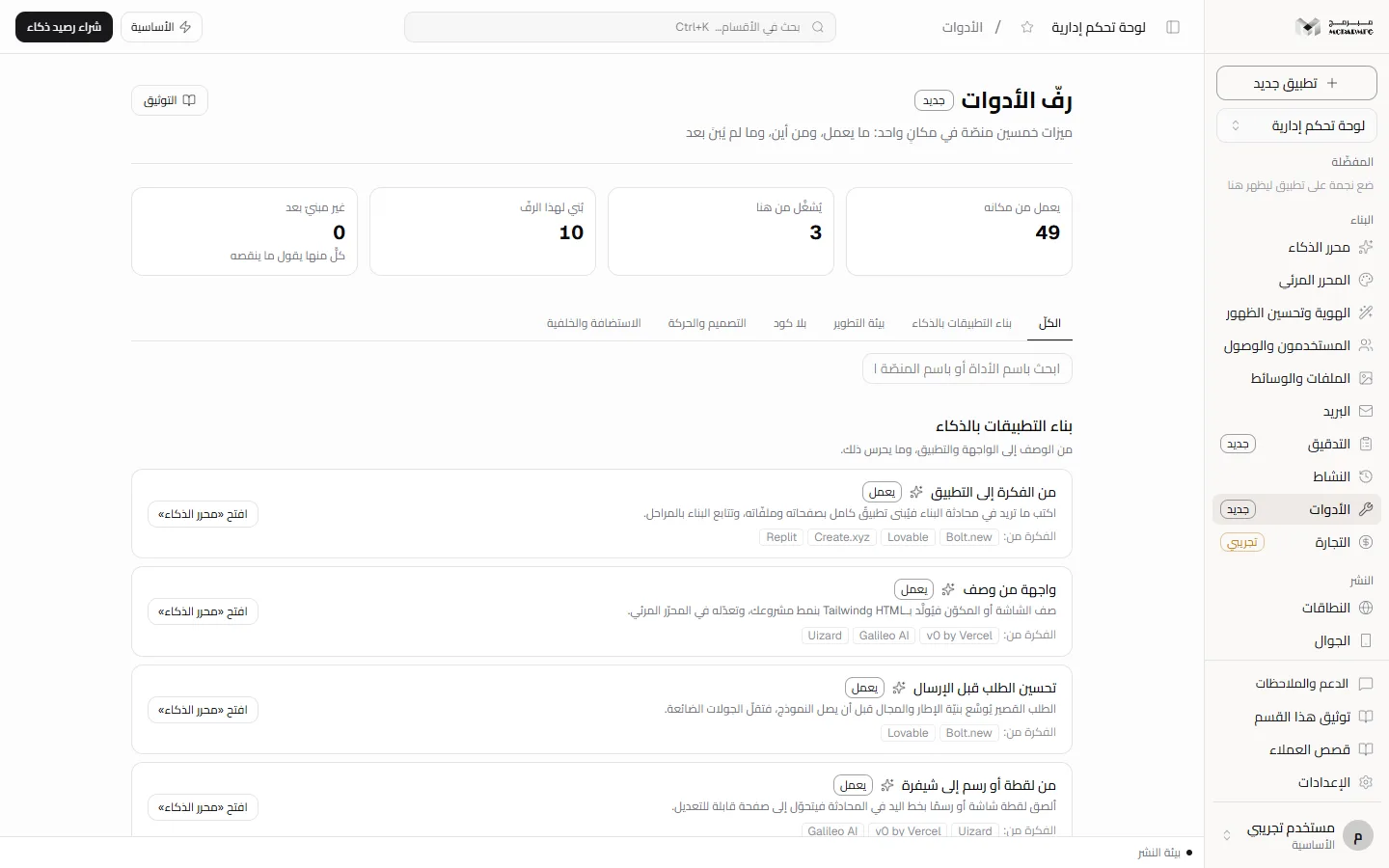
The four states
Above the list, four counters read from the same registry the cards read from:
- Works in place (49) — the capability exists in a workspace section or an editor panel; «افتح» (Open) takes you there.
- Run from here (3) — the API route existed but had no button; the shelf runs it on your project files and shows the result (code review, auto-debug, A/B test, widgets).
- New (10) — tools built for this shelf, described below.
- Not built (0) — the card states what is actually missing, never a vague promise.
A tool marked with a sparkle needs AI, which is for paid plans only; the free plan is refused with 402. The new tools are deterministic, with no model, so they work on every plan.
The five groups
- بناء التطبيقات بالذكاء — من الوصف إلى الواجهة والتطبيق، وما يحرس ذلك.
- بيئة التطوير — المحرّر والطرفية والحزم وGit والتعاون في المتصفح.
- بلا كود — القوالب والمحتوى والنماذج والعضويات والجوال.
- التصميم والحركة — الهوية والرموز والمؤثّرات والمشاهد ثلاثية الأبعاد.
- الاستضافة والخلفية — النشر والنطاقات والقاعدة والمراقبة والجدولة.
Search matches a tool's name, its description, or the platform the idea came from — type "Supabase" to see everything that corresponds to it.
Embedding Lottie, Spline and Rive
- Choose the kind and the page (HTML pages only;
index.htmlfirst). - Paste the link to the file, not to a page:
.lottieor.jsonfrom lottiefiles.com or lottie.host,scene.splinecodefrom spline.design, or.rivfrom rive.app. A path inside your project (/assets/…) is accepted too. - Set width, height and loop, then «أدرج في الصفحة» (Insert into page).
Any other host is refused with a message naming it: the shelf does not insert a script from an address it does not know into a customer's page. The player loads at a pinned version so it cannot change under your published site, and the markup is inserted before the end of the page with a unique id you can move in the Visual editor.
Locking files from the AI
One path per line: style.css is one file, legal/ is a folder and everything under it, *.json is a pattern. The limit is 100 paths, and .. is refused.
Once saved, any change the AI chat produces on a locked file is reverted to its previous text before saving — by the same guard that protects structural files (package.json, the schema, API routes) — and the chat reply says so. A locked file the model dropped comes back, and a new file under a locked folder is refused. You edit the file from the editor as you like; the lock is against the AI, not against you.
The lock list is read when the edit starts, next to the project files; if it cannot be read (say, a server the table migration has not reached yet) a warning is logged and the edit passes through the structural guard alone — customers' edits are not all disabled.
Feature flags
Add keys with an English name and a value (true/false, text, number), then «احفظ واحقن» (Save and inject). They are injected into the head of every HTML page as one window.MUBARMIJ_FLAGS block, replaced on every save; saving with no keys removes it. Read them in your code: if (window.MUBARMIJ_FLAGS?.newHero) …. The limit is 50 keys, and a text value is at most 200 characters.
Saving changes the project files, not the live site: publish again for visitors to see it (Versions keep what came before).
Sitemap planner
Pick your project's industry from the industry templates and the shelf draws the pages expected for it (home, about and contact, then its category's pages: shop and cart for commerce, menu and branches for food, doctors and booking for health…) and compares them with your project's pages: existing ones are marked and never touched, missing ones you select are created as HTML skeletons ready to edit, linked from the top navigation.
The planner creates HTML pages; for Next.js projects add the page from the chat.
Redirects and old links
Add rules /old ⇦ /new (301 permanent or 302 temporary). /blog/* matches everything under it and carries the rest to a target ending in *; the target is a path inside the site or a full https link. The limit is 100 rules, and the site root cannot be redirected.
Rules apply when your published site is served at its address (/your-site/… and your served domain) and take precedence over file resolution: a page you moved keeps its old address working. Exact match first, then the longest prefix.
Internal data panel
Pick one of your project's tables (data/<name>.json, created by importing a CSV in the Database section) and a page admin-<name>.html is generated that carries a snapshot of the table and shows it: search, sort by clicking a column, and CSV export, tagged noindex. After the table changes, regenerate it with «استبدال» (replace).
Honestly read-only: a static site has no server to write the table; write from the Database section or by importing a new CSV. An existing page is only replaced when «استبدال» (replace) is switched on.
Saved tasks, one click
Requests you repeat (such as "improve SEO and add an FAQ") are saved under a name, and «شغّل في المحادثة» (Run in chat) hands the prompt to the AI editor, where it runs immediately as if you had typed it — at most 20 tasks. This is the product's form of run tasks: chat only, no commands executed on the host.
In the chat itself, prompt autocomplete: after three characters up to three ready completions appear under the box, and one click picks one.
Backend functions and realtime data (the runtime package)
On paid plans your own container serves your published snapshot and runs your functions. A file functions/<name>.mjs exporting a function that takes a Request and returns a Response (as on Vercel and Netlify) answers /api/<name> at your site's address; a text/event-stream response streams realtime data the page reads with new EventSource("/api/events"). «أضف دالّتَي مثال» (Add two example functions) adds functions/hello.mjs and functions/events.mjs.
- Publish the project (the package serves the published snapshot, never the editor draft).
- Click «جهّز الحزمة» (Provision the package): your files are written to the package directory and a container starts within your plan's limits (CPU, memory, processes, no privileges, published on the host's loopback only).
- Every later publish refreshes the package's files automatically; the package hibernates when idle and wakes on «أيقظ الحزمة».
The free plan has no container (a static site served by the platform). A function has 30 seconds for its first byte, cannot reach platform files or secrets, and whatever it reads or writes over the network is your responsibility.
Ready-made widgets
A WhatsApp button (with your number and a prepared message), back to top, a cookie bar, and a newsletter popup — choose the page and it is inserted before its end. A widget is inserted once per page; a second insert is refused.
How files are written
Every action that writes project files reads them first and writes with compare-and-swap: if a teammate or a chat changed the project between the read and the write, the action is refused with 409 «تغيّرت نسخة المشروع» (the project version changed) instead of overwriting their work — try again. Every action is recorded in the app's event log.
FAQ
Why don't I see a particular platform on the shelf?
The shelf takes the idea, not the software: a platform's features are spread across the tools that correspond to them. Search by its name to see them all.
Will a "not built" tool be built?
Its card says exactly what it is missing; whatever gets built changes its tag in the same registry, so this page never carries a promise the code does not.