

Building with AI
The Chat integrations section — installing, verifying and tools
The «تكاملات المحادثة» (Chat integrations) section is a catalog of external services you install for yourself in this app. Your teammates do not see them, and they add to the build chat a list of what is connected and its tools. Enabling only happens after the connection is verified.
On this page
Open the section from the sidebar as «تكاملات المحادثة» (Chat integrations). Above the catalog is the scope note: «تُثبَّت لكل مستخدم على حدة وتظهر لك أنت وحدك — تضيف أدوات وسياقًا إلى محادثة البناء في هذا التطبيق.» (Installed per user and visible to you alone — they add tools and context to the build chat in this app). Integrations that serve all your apps are managed from «التكاملات» (Integrations) on the dashboard, not here.
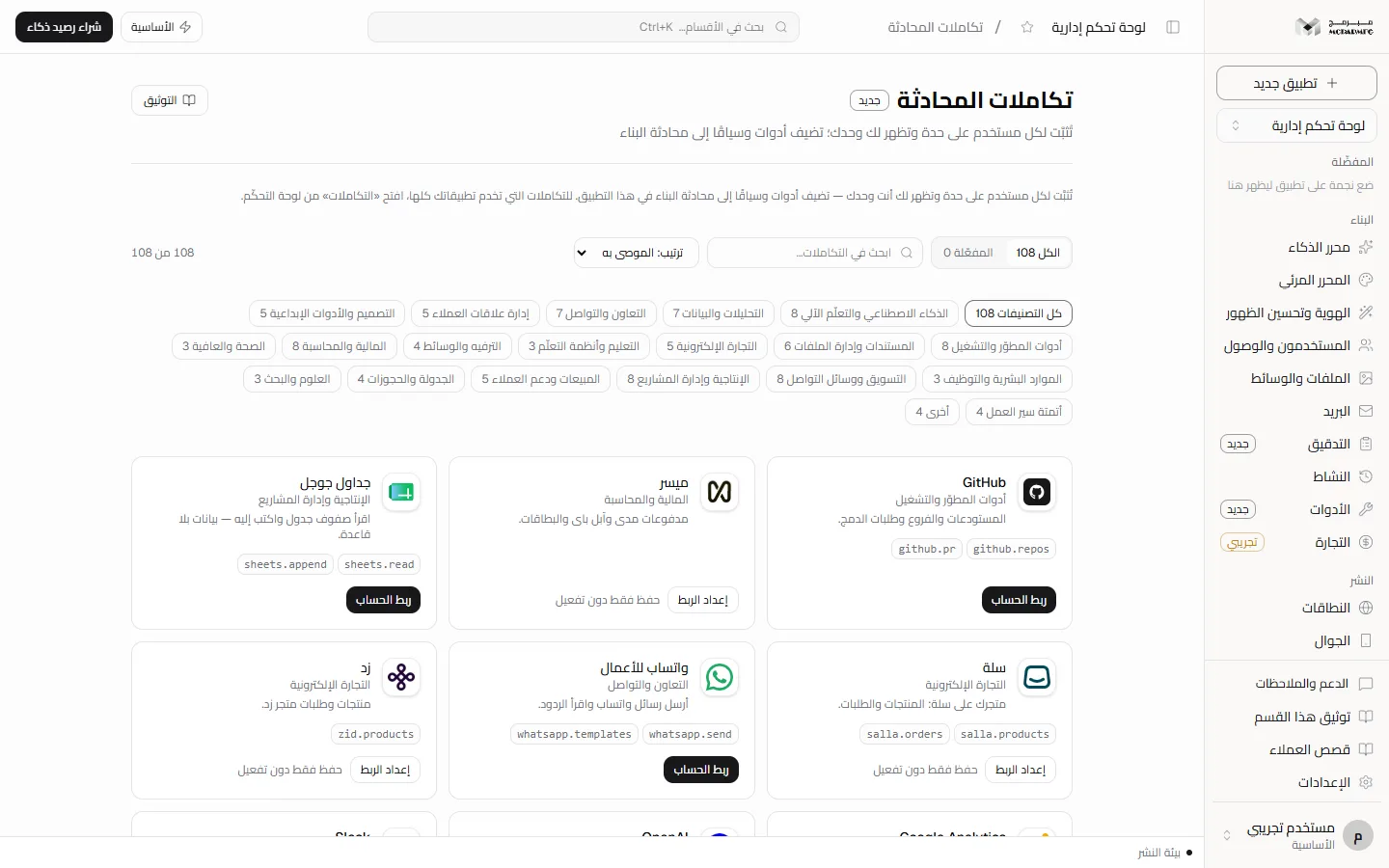
Browsing the catalog
- Switch between «الكل» (All) and «المفعّلة» (Enabled); the number next to each is the count.
- Type a name, description or category into «ابحث في التكاملات…» (Search integrations…).
- Change the order: «الموصى به» (Recommended), «الاسم» (Name) or «الأحدث» (Newest).
- Press a category chip such as «التجارة الإلكترونية» (E-commerce) or «المالية والمحاسبة» (Finance and accounting), or «كل التصنيفات» (All categories).
Each card shows the name, category and description, then the tools the connector declares in code font (for example openai.complete).
Connecting an account (automatic-connection integrations)
- Press «ربط الحساب» (Connect account). A popup titled «ربط الحساب» opens saying «جارٍ تجهيز صفحة الربط الآمنة…» (Preparing the secure connection page…). If the browser blocks it you see «اسمح بالنوافذ المنبثقة لهذه الصفحة لإتمام ربط الحساب» (Allow popups for this page to finish connecting).
- Finish signing in to the service in the popup.
- On success «تم ربط الحساب والتحقق منه» (Account connected and verified) appears and the status becomes «متصل» (Connected). If it does not finish you see «لم يكتمل ربط الحساب» (Connection not completed) or «انتهت مهلة الربط، حاول مرة أخرى» (Connection timed out, try again), and the button becomes «إعادة المحاولة» (Retry).
- Once connected, the button becomes «فحص الربط» (Check connection) to confirm the connection is still active.
Automatic connection relies on a connection provider (Composio) that must be configured on the server. If the message «الربط التلقائي غير مهيّأ على الخادم: أضف COMPOSIO_API_KEY» (Automatic connection is not configured on the server: add COMPOSIO_API_KEY) appears, you cannot connect the account from your side: Requires contacting support.
Entering keys manually
- Press «إعداد الربط» (Set up connection), or «تعديل الإعداد» (Edit setup) for an installed connector.
- Fill in the fields; an asterisk marks a required field, and a secret field «يُحفَظ مشفّرًا ولا يُعرَض بعدها» (is stored encrypted and never shown again).
- Press «حفظ والتحقق» (Save and verify). If verification succeeds «تم التحقق من الاتصال وتفعيله» (Connection verified and enabled) appears. If the service rejects the keys an error appears and the connector is not enabled.
Some connectors have no automatic verification, so you see «لا يتوفر تحقق آلي آمن لهذا التكامل حاليًا؛ ستُحفظ الإعدادات مشفّرة ويظل التكامل معطّلًا.» (No safe automatic verification is available for this integration yet; settings will be stored encrypted and the integration stays disabled). The button becomes «حفظ الإعدادات» (Save settings) and the status «محفوظ دون تحقق» (Saved without verification).
Enabling and disconnecting
- The enable switch appears on a card only after the connector is installed and verified. Enabling a connector whose connection is incomplete is refused with «لا يمكن تفعيل التكامل قبل اكتمال ربط الحساب» (Cannot enable before the account connection is complete).
- To disconnect, press the trash icon and confirm «فصل … وحذف إعداداته؟» (Disconnect … and delete its settings?); «تم فصل التكامل وحذف إعداداته» (Integration disconnected and settings deleted) appears.
Custom integration
In the «تكامل مخصّص» (Custom integration) panel type «المفتاح (بالإنجليزية)» (Key, in English) and «الاسم المعروض» (Display name), then «إضافة» (Add). The integration is saved but not enabled.
Enabling a custom integration is Not available yet: it is refused with «لا يمكن تفعيل تكامل مخصّص قبل إضافة آلية تحقق له» (A custom integration cannot be enabled before a verification mechanism is added), and it does not support automatic connection.
What reaches the agent
With every build request a list of enabled, verified connectors is added, with each one's name and tools, so the agent can plan around them.
Calling connector tools from the chat is Not available yet: the agent knows the connector is connected and what its tools are, and is told not to claim it called them but to suggest how you could use them.
Plans and locking
The «تكاملات المحادثة» section requires the AI capability. On the «المجانية» (Free) plan the AI quota is 0 requests a day, so the section shows as locked and the server answers 402 with PLAN_CAPABILITY_REQUIRED and the text «الذكاء الاصطناعي متاح في الباقات المدفوعة فقط — خطة المجانية تشمل القوالب الجاهزة والمحرّر المرئي.» (AI is available on paid plans only; the المجانية plan includes ready templates and the visual editor).
- «الأساسية» (Basic): 50 AI requests a day.
- «المميزة» (Premium): 200 AI requests a day.
- «الاحترافية» (Professional): 1000 AI requests a day.
The build request in the chat is itself refused with status 402 and code AI_PAID_ONLY on the free plan, and with status 429 and code AI_RATE_LIMITED once the daily quota is used up. Upgrade from Billing.
If you are a collaborator on someone else's project, the section lock follows the project owner's plan, not yours. Sending a build request from the chat of a project you do not own is Not available yet: the server answers «المشروع غير موجود» (Project not found).
See also the build chat and Skills.
FAQ
I installed a connector — does my teammate on the project see it?
No. The installation is tied to your account and this app together. The section itself is for the project owner alone: a collaborator with any role is refused with «هذا الإجراء لمالك المشروع وحده» (This action is for the project owner alone).
Why is there no enable switch on the card?
Because the connector is not installed or its connection is not verified yet. Complete «ربط الحساب» (Connect account) or «حفظ والتحقق» (Save and verify).