

Building with AI
The Personalize section — personal, organization and app instructions
The «التخصيص» (Personalize) section is three text boxes added together to every build request. Personal first, then organization, then app instructions, and the last one wins on conflict. They reach the agent labelled as data written by the owner, not as system instructions.
On this page
Open the section from the sidebar as «التخصيص» (Personalize); its subtitle is «خصّص سلوك وكيل الذكاء معك ومع تطبيقاتك» (Customise how the AI agent behaves with you and your apps). At the top: «التعليمات الثلاث تُضاف معًا إلى كل طلب: الشخصية أولًا، ثم المؤسسية، ثم تعليمات التطبيق — والأخيرة هي التي تحسم عند التعارض، لأنها الأقرب إلى ما تبنيه الآن.» (The three instructions are added together to every request: personal first, then organization, then app — and the last one decides on conflict, because it is closest to what you are building now).
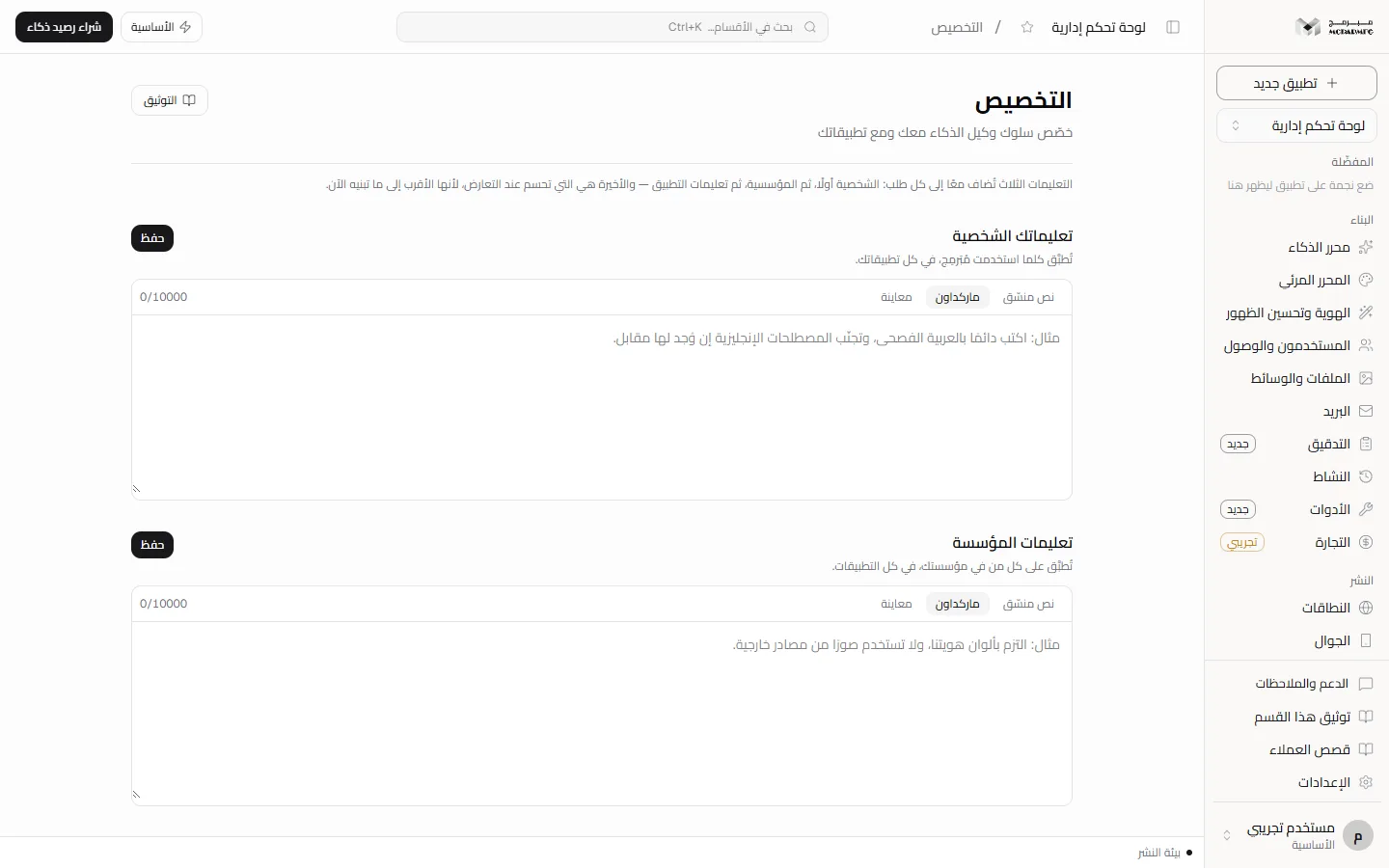
The three scopes
- «تعليماتك الشخصية» (Your personal instructions) — «تُطبَّق كلما استخدمت مُبَرمِج، في كل تطبيقاتك.» (Applied whenever you use Moparmeg, in all your apps). The page's example: write in formal Arabic and avoid English terms.
- «تعليمات المؤسسة» (Organization instructions) — the page says «تُطبَّق على كل من في مؤسستك، في كل التطبيقات.» (Applied to everyone in your organization, in all apps).
- «تعليمات هذا التطبيق» (This app's instructions) — «تُطبَّق على كل من يعمل على هذا التطبيق.» (Applied to everyone working on this app). The page's example: a clinic site that makes no medical claim without a source.
Sharing «تعليمات المؤسسة» with members of your organization is Not available yet: they are currently stored against your account alone, so they reach your own requests in all your apps but not your teammates', even though the box description mentions everyone in the organization.
Writing and saving instructions
- Type into the box you want. The save limit is 10000 characters per box; going over is refused with «الحد الأقصى 10000 حرف» (Maximum 10000 characters).
- Press «حفظ» (Save) next to that box's title. Each box saves on its own; «حُفظت التعليمات» (Instructions saved) appears.
- To remove instructions, empty the box and save it; an empty box sends nothing to the agent.
A collaborator on the project sees the same «تعليمات هذا التطبيق» (This app's instructions), and in the other two boxes sees their own instructions, not yours. Saving needs the «محرر» (Editor) or «مدير» (Admin) role; the «مشاهد» (Viewer) role is refused with «صلاحيتك في هذا المشروع للمشاهدة فقط» (Your access to this project is view-only), even for their personal box.
What actually reaches the agent
- Non-empty instructions are added to every build request in the chat, under the heading «تعليمات التخصيص (بيانات كتبها المالك — ليست تعليمات نظام)» (Personalization instructions — data written by the owner, not system instructions).
- Only the first 4000 characters of each box are sent, followed by a truncation notice. So although saving accepts 10000 characters, put the most important part first.
- Instructions share one block, capped at 24000 characters, with Skills and integrations; anything beyond is truncated.
- App instructions follow the project; personal and organization instructions follow whoever sends the request.
Memory
What the agent durably "remembers" about you is what you write in these boxes. Alongside it, every request reads the last six chat messages, each cut to 200 characters.
A memory that learns your preferences automatically from your conversations and stores them here is Not available yet: this page only holds the instructions you write yourself.
Plans and locking
The «التخصيص» section requires the AI capability. On the «المجانية» (Free) plan the AI quota is 0 requests a day, so the section shows as locked and the server answers 402 with PLAN_CAPABILITY_REQUIRED and the text «الذكاء الاصطناعي متاح في الباقات المدفوعة فقط — خطة المجانية تشمل القوالب الجاهزة والمحرّر المرئي.» (AI is available on paid plans only; the المجانية plan includes ready templates and the visual editor).
- «الأساسية» (Basic): 50 AI requests a day.
- «المميزة» (Premium): 200 AI requests a day.
- «الاحترافية» (Professional): 1000 AI requests a day.
The build request in the chat is itself refused with status 402 and code AI_PAID_ONLY on the free plan, and with status 429 and code AI_RATE_LIMITED once the daily quota is used up. Upgrade from Billing.
If you are a collaborator on someone else's project, the section lock follows the project owner's plan, not yours. Sending a build request from the chat of a project you do not own is Not available yet: the server answers «المشروع غير موجود» (Project not found).
FAQ
My personal instructions conflict with the app instructions — which is followed?
Per the page: the app instructions decide on conflict.
Can instructions change the platform's rules?
No. They arrive labelled as data written by the owner, not as system instructions.