

Workspace sections
Backend: deployment environments and plan resources
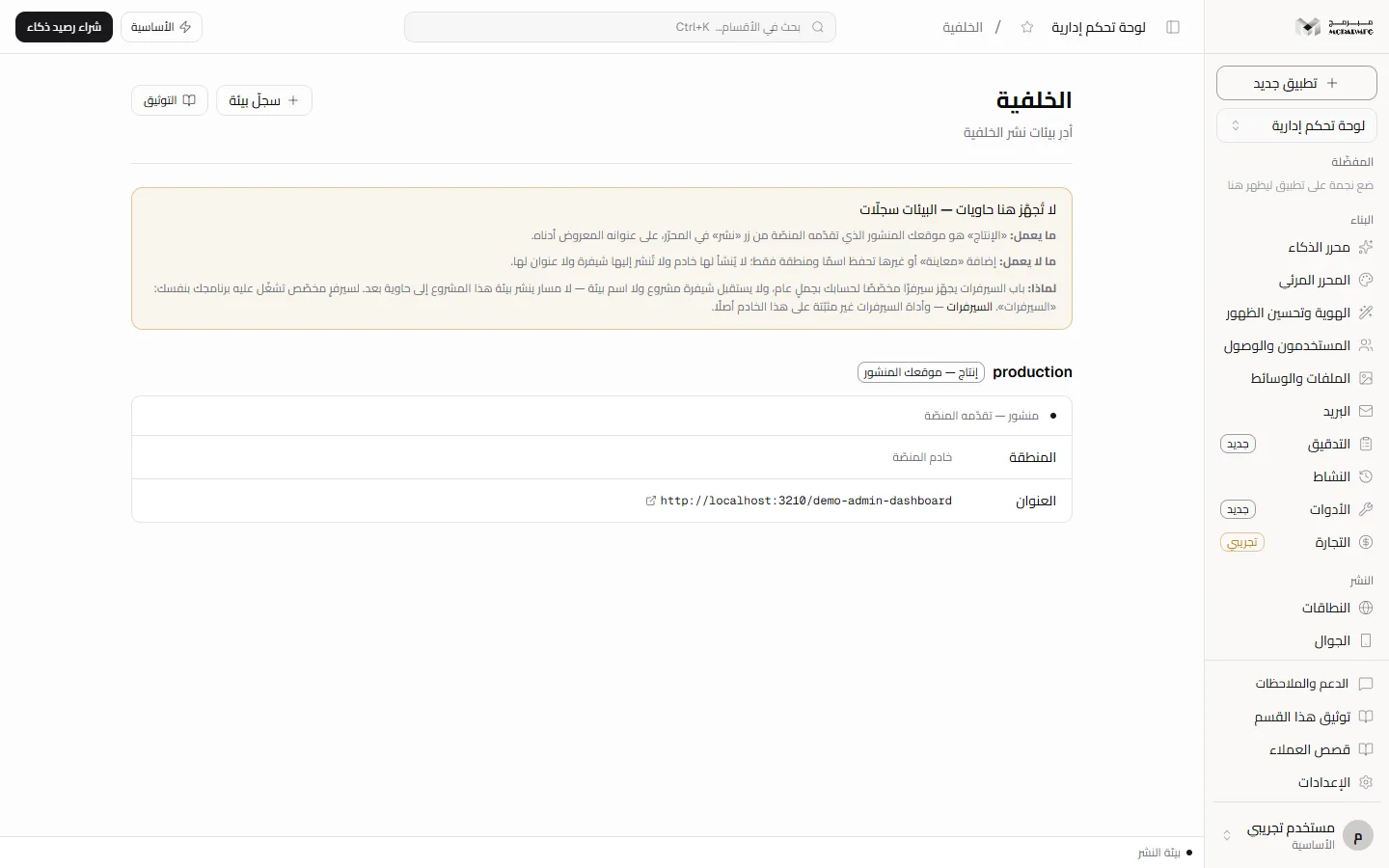
The «الخلفية» (Backend) section lists your project's deployment environments. Its notice is explicit: «لا تُجهَّز هنا حاويات — البيئات سجلّات» (no containers are provisioned here; environments are records). Adding an environment record saves its name and region only; real deployment happens from the «نشر» (Publish) button in the editor.
On this page
Access and plans
Open «الخلفية» (Backend) under «متقدّم» (Advanced). The section needs hosting: it is locked on المجانية (Free), whose site is served by the platform with no container, and refused with HTTP 402.
Environment records get no server, no deployed code and no address: the platform's servers door provisions a dedicated server for your account with a generic workload, and it accepts neither project code nor an environment name. Provisioning a real preview environment is Not available yet. The notice at the top gives the reason and links to «السيرفرات» (Servers) for anyone who wants a dedicated server to run their own program on.
The production environment
The first time the section opens, a record named production is created automatically with a «إنتاج — موقعك المنشور» (Production, your published site) badge: it is your site served by the platform from the «نشر» (Publish) button, its region shows «خادم المنصّة» (platform server), and its address is your site's platform address. Its status is «منشور — تقدّمه المنصّة» (published, served by the platform) if the project is published, otherwise «غير منشور بعد» (not published yet). It has no delete button and the server refuses to delete it («لا يمكن حذف بيئة الإنتاج», the production environment cannot be deleted). To deploy use Publish.
Adding an environment
- Click «سجلّ بيئة» (Environment record) at the top of the section; the «سجلّ بيئة جديد» (New environment record) panel opens.
- Type a name (for example
staging): starts with a lowercase English letter and accepts lowercase letters, digits and hyphens, 2 to 31 characters. - Pick a region: «أوروبا — فالكنشتاين (ألمانيا)» (Falkenstein, Germany), «أوروبا — هلسنكي (فنلندا)» (Helsinki, Finland), «الشرق الأوسط — الرياض» (Riyadh) or «أمريكا — فرجينيا الشمالية» (Northern Virginia).
- Click «حفظ السجلّ» (Save record). You see «حُفظ السجلّ — لم يُجهَّز له خادم» (record saved, no server provisioned) and a card with a «سجلّ فقط» (Record only) badge and status «سجلّ فقط — لم تُجهَّز حاوية» (record only, no container provisioned).
Errors: «اسم البيئة يقبل الحروف الصغيرة والأرقام والشرطة» (name accepts lowercase letters, digits and hyphens), «منطقة غير معروفة» (unknown region), «توجد بيئة بهذا الاسم» (an environment with this name exists). A new record has no address: «لا عنوان — لا خادم خلف هذا السجلّ» (no address, no server behind this record), and its region is followed by «(مسجّلة لا مجهّزة)» (recorded, not provisioned). The chosen region is stored on the record and does not move your app there. To delete a preview environment click the trash icon on its card.
Container resources per plan
These numbers come from the plan contract; the section itself does not display them:
| Plan | Cores | Memory (GB) | Disk (GB) | Processes | Apps | Idle |
|---|---|---|---|---|---|---|
| الأساسية | 1 | 1 | 10 | 32 | 1 | after 60 idle minutes |
| المميزة | 2 | 4 | 40 | 128 | 5 | after 60 idle minutes |
| الاحترافية | 2 | 8 | 40 | 512 | 5 | no idle shutdown |
المجانية (Free) has no container and no resources. On plans with an idle limit the container stops after that time without visits, returning cores and memory to the pool while the project disk stays; the next visit counts as activity. Shutdown is done by a periodic platform process and is not shown in this section. الاحترافية (Professional) is a separate server and does not hibernate.
Managed WordPress
The plan contract lists managed WordPress on الأساسية, المميزة, الاحترافية, but it does not appear in the Backend section.
The managed WordPress line is dormant by default: its switch on the server is off unless explicitly enabled, and its page answers not-found while off. Managed WordPress is Not available yet and Requires contacting support.