

Getting started
Moparmeg quick start guide
Every new account starts on a 3-day trial of the Basic plan, then returns to the Free plan, which includes ready-made templates and the visual editor only. This page walks you from registration to a first published site and says plainly what gets refused and why.
On this page
Create an account
- Open the registration page
/register, titled «إنشاء حساب جديد» (Create a new account). - Fill in «الاسم» (Name), «البريد الإلكتروني» (Email) and «كلمة المرور» (Password, at least 8 characters), then press «إنشاء حساب» (Create account). Or choose Google or GitHub under «أو سجّل بـ» (Or sign up with).
- With email sign-up you see «تحقق من بريدك الإلكتروني» (Check your email). Open the activation link within 24 hours, then press «الذهاب لتسجيل الدخول» (Go to sign in).
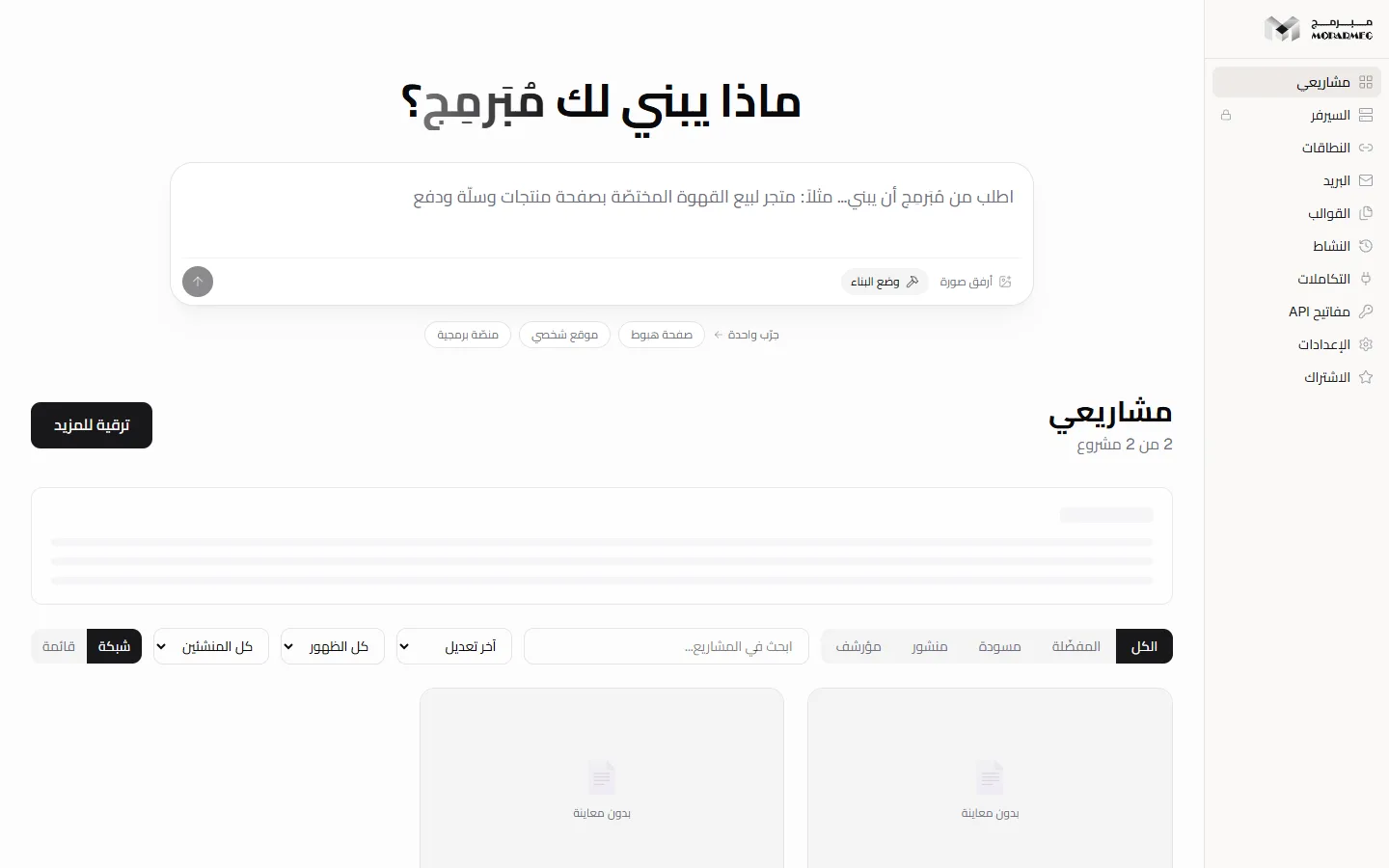
- Sign in and you land on the «مشاريعي» (My projects) dashboard.
What can be refused: an address already in use («البريد الإلكتروني مسجّل مسبقاً», email already registered), and more than five sign-up attempts from the same address in an hour («عدد محاولات كثيرة. حاول لاحقاً.», too many attempts). Signing in before verifying is refused with «يجب تفعيل بريدك الإلكتروني أولاً» (You must verify your email first). If the activation email could not be sent, the account still exists and you see «أُنشئ الحساب — لكن البريد لم يخرج» (Account created — but the email did not go out); resend it from the sign-in page with «إعادة إرسال رابط التفعيل» (Resend activation link). Google and GitHub accounts are verified immediately.
The trial, then the Free plan
Every new account, whether by email, Google or GitHub, starts on the Basic plan for 3 days from the moment of registration. During that time the billing page shows «تجربة مجانية - تنتهي …» (Free trial - ends …). When the period ends the account is treated as Free immediately, and a nightly job then records the change.
The Free plan includes:
- 1 project, up to 1 MB.
- Static HTML sites only, built from templates and edited in the visual editor.
- 0 AI requests. Every AI route answers with HTTP
402and codeAI_PAID_ONLY, plus a link to/billing.
Workspace sections that need a capability your plan lacks (such as «محرر الذكاء» (AI editor), «البريد» (Email) and «التجارة» (Commerce)) stay locked and give a reason, for example «الذكاء الاصطناعي متاح في الباقات المدفوعة فقط — خطة المجانية تشمل القوالب الجاهزة والمحرّر المرئي.» (AI is available on paid plans only — the Free plan includes ready templates and the visual editor.)
Anything you created during the trial beyond the Free limits is not deleted. But you cannot create a new project while you are over the quota, and only static files can be published.
The onboarding wizard: seven screens
The wizard appears once for every new account, over the dashboard. Its screens, in order:
- «مرحباً بك في مبرمج» (Welcome to Moparmeg), with the button «ابدأ» (Start).
- «ابنِ تطبيقات قويّة» (Build powerful apps).
- «خصّص هويتك» (Customize your brand).
- «استقبل المدفوعات» (Accept payments).
- «توسّع إلى الملايين» (Scale to millions).
- «كيف سمعت عنّا؟» (How did you hear about us?). «التالي» (Next) stays disabled until you pick at least one source.
- «افتح مبرمج الأساسية» (Unlock Moparmeg Basic).
Move between screens with «التالي» (Next) and «رجوع» (Back). Under every screen except «كيف سمعت عنّا؟» (How did you hear about us?) there is a link to the documentation page that explains it (on the first, «دليل البدء خطوة بخطوة», the step-by-step quick start); it opens in a new tab so your progress in the wizard is not lost. Escape and clicking outside do not close the wizard; only the last screen's two buttons do. On a Free account the last screen shows the Basic price: 99 SAR a month, or 79 SAR a month billed yearly (950 SAR a year). Its two buttons are «تخطّي الآن» (Skip for now), which closes the wizard, and «ابدأ الاشتراك» (Start subscription), which takes you to checkout. If saving fails you see «تعذّر الحفظ. تحقّق من اتصالك وحاول مرة أخرى.» (Could not save. Check your connection and try again.)
Screens two to five describe the platform's capabilities in general: payments, custom domains, hosting. Most of them are paid-plan features, and the plan table on the billing page is the reference. During the trial the last screen says «أنت مشترك بالفعل — كل شيء جاهز.» (You are already subscribed — everything is ready) with the button «ابدأ الاستخدام» (Start using), even though you are on a trial that ends after 3 days, not on a paid subscription.
Your first project
At the top of «مشاريعي» (My projects) is a counter such as "1 of 1". While your quota allows, you get three buttons:
- «+ مشروع جديد» (+ New project), or «إنشاء مشروع» (Create project) on an empty dashboard: creates a blank HTML project named «مشروع جديد» (New project) and opens it straight in the visual editor.
- «من قالب» (From a template): opens the «مشروع جديد» (New project) dialog, where you pick an industry template or a basic template. Details in Create a project and Templates.
- «📥 استيراد» (Import): imports an existing project, and it counts against the quota too.
On a Free account the dashboard header shows «ابدأ من قالبٍ جاهز» (Start from a ready template) instead of the prompt box. Paid accounts get the box «اطلب من مُبَرمِج أن يبني…» (Ask Moparmeg to build…). The link /dashboard?new=true (in the welcome email and the app shortcut) creates a blank project automatically when the quota allows; otherwise it does nothing and «ترقية للمزيد» (Upgrade for more) stays visible.
Edit, then publish
- In the visual editor, click any element in the preview to edit its text or style.
- Press «نشر» (Publish) in the top bar. The editor saves the visible version first, then publishes it.
- The site goes live at
moparmeg-ksa.com/your-site-name, and a «تم نشر مشروعك!» (Your project is published!) notification gives you the address.
The Free plan publishes static files only, and its sites keep the «صُنع بمُبَرمِج» (Made with Moparmeg) badge. Details and refusal reasons are on the Publish page.
Where to go next
- Visual editor — editing by clicking.
- Building with AI — paid plans.
- Billing and plans — the plan table and upgrades.
FAQ
Is AI available on the Free plan?
No. The Free quota is 0 requests a day, and every AI route refuses with HTTP 402. Free includes templates and the visual editor; AI starts with the Basic plan (50 requests a day).
What happens when the trial ends?
The account is treated as Free. Your projects stay, but creating beyond the quota is refused, and sites that need a server runtime are not served.
I did not receive the activation email.
Check your spam folder, then use «إعادة إرسال رابط التفعيل» (Resend activation link) on the sign-in page. The activation link is valid for 24 hours.