

Workspace sections
Commerce: catalog, orders and Moyasar payments
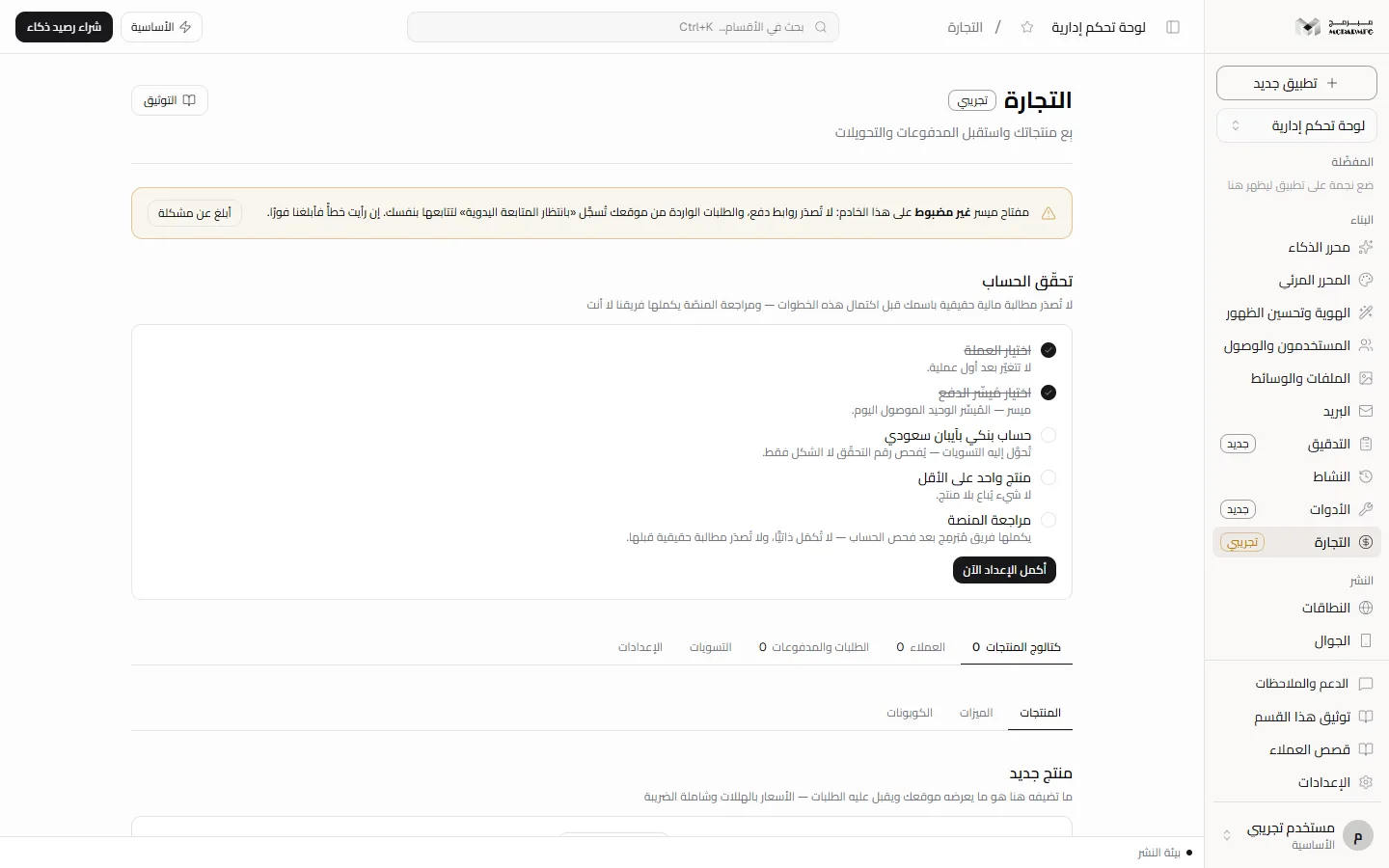
The «التجارة» (Commerce) section carries a «تجريبي» (Beta) badge. What you add to the catalog is what your site shows and accepts orders for, and prices are computed on the server, not in the browser. Payment runs through Moyasar invoices, and a banner at the top always tells you whether money is real or test.
On this page
Access and plans
Open «التجارة» (Commerce) from «البناء» (Build) in the sidebar. The section needs the commerce capability, so it is locked on المجانية (Free) and available on الأساسية, المميزة, الاحترافية. A plan without it is refused with HTTP 402, and that owner's site tells visitors «المتجر لا يستقبل طلبات حاليًا: التجارة ليست ضمن باقة صاحب الموقع» (the store is not accepting orders: commerce is not in the owner's plan).
The section is beta: the platform's Moyasar key is currently a test key, so no real money moves until the live key is enabled after platform review. Live charging is Not available yet.
Payment mode banner
A permanent banner at the top reads the server's state:
- Key unset: no payment links are issued, and orders from your site are recorded as «بانتظار المتابعة اليدوية» (awaiting manual follow-up) for you to handle.
- Test key: real-looking invoices are created and no money moves.
- Live key: new payments are real money, and no charge is issued before platform review.
«أبلغ عن مشكلة» (Report a problem) opens a field to describe what you saw, then «إرسال» (Send); the report is stored in the audit log.
Account verification
The «تحقّق الحساب» (Account verification) panel stays until five steps are done: «اختيار العملة» (choose currency), «اختيار مُيسِّر الدفع» (choose payment provider), «حساب بنكي بآيبان سعودي» (Saudi IBAN bank account), «منتج واحد على الأقل» (at least one product) and «مراجعة المنصة» (platform review). «أكمل الإعداد الآن» (Complete setup now) takes you to the «الإعدادات» (Settings) tab.
«مراجعة المنصة» (platform review) cannot be completed by you: the Mubarmij team completes it after checking the account, and it shows «بانتظار المراجعة» (awaiting review). This step Requires contacting support.
Settings
- «العملة» (Currency): pick from the list. It locks after the first transaction, and Moyasar charges in SAR only; issuing a payment in another currency is refused with HTTP 501.
- «مُيسِّر الدفع» (Payment provider): Moyasar is the only connected option.
- «الآيبان» (IBAN): type a Saudi IBAN starting with SA and click «حفظ» (Save). The check digits are validated; a wrong number returns a message asking you to review it.
«حالة التحقّق» (Verification status) shows «موثَّق» (Verified), «بانتظار مراجعة المنصّة» (awaiting platform review) or «ينقص: …» (Missing: …).
Product catalog
The «كتالوج المنتجات» (Product catalog) tab has three sub-tabs:
- «المنتجات» (Products): fill «اسم المنتج» (product name) and «السعر بالهللات» (price in halalas, an integer, VAT included), choose the billing cycle («دفعة واحدة» one-time, «شهري» monthly or «سنوي» yearly), then «إضافة» (Add). The toggle deactivates a product and the trash icon deletes it.
- «الميزات» (Features): choose a product, type «اسم الميزة» (feature name) and «الحدّ (اختياري)» (limit, optional), then «إضافة».
- «الكوبونات» (Coupons): type the code (English letters, digits, «-» and «_», 3 to 32 characters), choose «نسبة ٪» (percent) or «مبلغ ثابت (هللات)» (fixed amount in halalas), enter the value, then «إضافة».
With no products, your site's products section shows display-only examples without a buy button.
Orders and payments
The «الطلبات والمدفوعات» (Orders and payments) tab starts with «الطلبات من موقعك» (Orders from your site): an order appears the moment a visitor clicks «إتمام الشراء» (Checkout), before and after payment. Order states: «بانتظار الدفع» (awaiting payment), «بانتظار المتابعة اليدوية» (awaiting manual follow-up), «فشل إنشاء رابط الدفع» (payment link failed), «مدفوع» (paid), «مُنفَّذ» (fulfilled), «ملغى» (cancelled), «مُستردّ» (refunded). Available buttons:
- A paid order: «تمّ التنفيذ» (Fulfilled).
- An order awaiting manual follow-up or with a failed payment link: «استلمتُ المبلغ يدويًا» (I received payment manually) or «إلغاء» (Cancel).
- An order awaiting payment: «إلغاء» (Cancel).
When the Moyasar key is unset the order is recorded as awaiting manual follow-up and the buyer sees «الدفع الإلكتروني غير مفعَّل في هذا المتجر بعد — سُجِّل طلبك وسيتواصل معك المتجر لإتمامه» (online payment is not enabled in this store yet; your order is recorded and the store will contact you).
When the key is set but Moyasar refuses to create the payment link, the order is recorded as «فشل إنشاء رابط الدفع» (payment link failed) and the buyer sees «تعذّر إنشاء رابط الدفع — سُجِّل طلبك وسيتواصل معك المتجر: …» (the payment link could not be created; your order is recorded and the store will contact you). An alert at the top of the section («طلبٌ واحد لم يُنشأ له رابط دفع لدى ميسر», one order has no Moyasar payment link, or the number of orders) lists their references and Moyasar's last reason, and you get a notification in the dashboard and by email. A link you issue yourself that Moyasar refuses gets the same status and a dashboard notification.
«إصدار رابط دفع» (Issue a payment link): choose a product, a customer or «بلا عميل» (no customer), an optional coupon code, then «إصدار» (Issue). «المطلوب» (Amount due) shows the discounted total, then the link «افتح صفحة الدفع لدى ميسر» (open the Moyasar payment page). Status updates after payment via the webhook. Issuing is disabled without a key and refused on a live key before platform review.
The «المدفوعات» (Payments) panel lists each payment as «قيد المعالجة» (pending), «ناجحة» (succeeded), «فاشلة» (failed) or «مُستردّة» (refunded), with a «تجريبية» (Test) badge for test payments; its badge is total revenue.
The «استرداد» (Refund) button appears on a succeeded payment that went through Moyasar (test or live) and on a test payment. For a payment that went through Moyasar, a refund of the full amount is requested from Moyasar with the key it was created with, and it is marked «مُستردّة» (refunded), with its order «مُستردّ», only after Moyasar confirms the money went back; a live payment asks for confirmation first: «استرداد كامل المبلغ عبر ميسر — مالٌ حقيقي يعود إلى المشتري ولا يُتراجع عنه. متابعة؟» (refund the full amount through Moyasar; real money returns to the buyer and cannot be undone, continue?). A live payment with no Moyasar id cannot be refunded here and is never marked refunded by hand.
Customers
In «العملاء» (Customers) add an email under «عميل جديد» (New customer) then «إضافة» (Add), or let buyers be added automatically when they type their email in your site's cart. Each customer shows their total paid.
Payouts
Payouts are Not available yet: nothing in the code writes them. The «التسويات» (Payouts) tab stays empty until the first real collection cycle and a platform decision on merchant transfers, and test payments are never settled. Settling with the store owner Requires contacting support.
There is no shipping calculator and no provider other than Moyasar today. See Plans and Publish.