

Checks and quality
Workspace Tests section — HTTP checks for your published site | Moparmeg
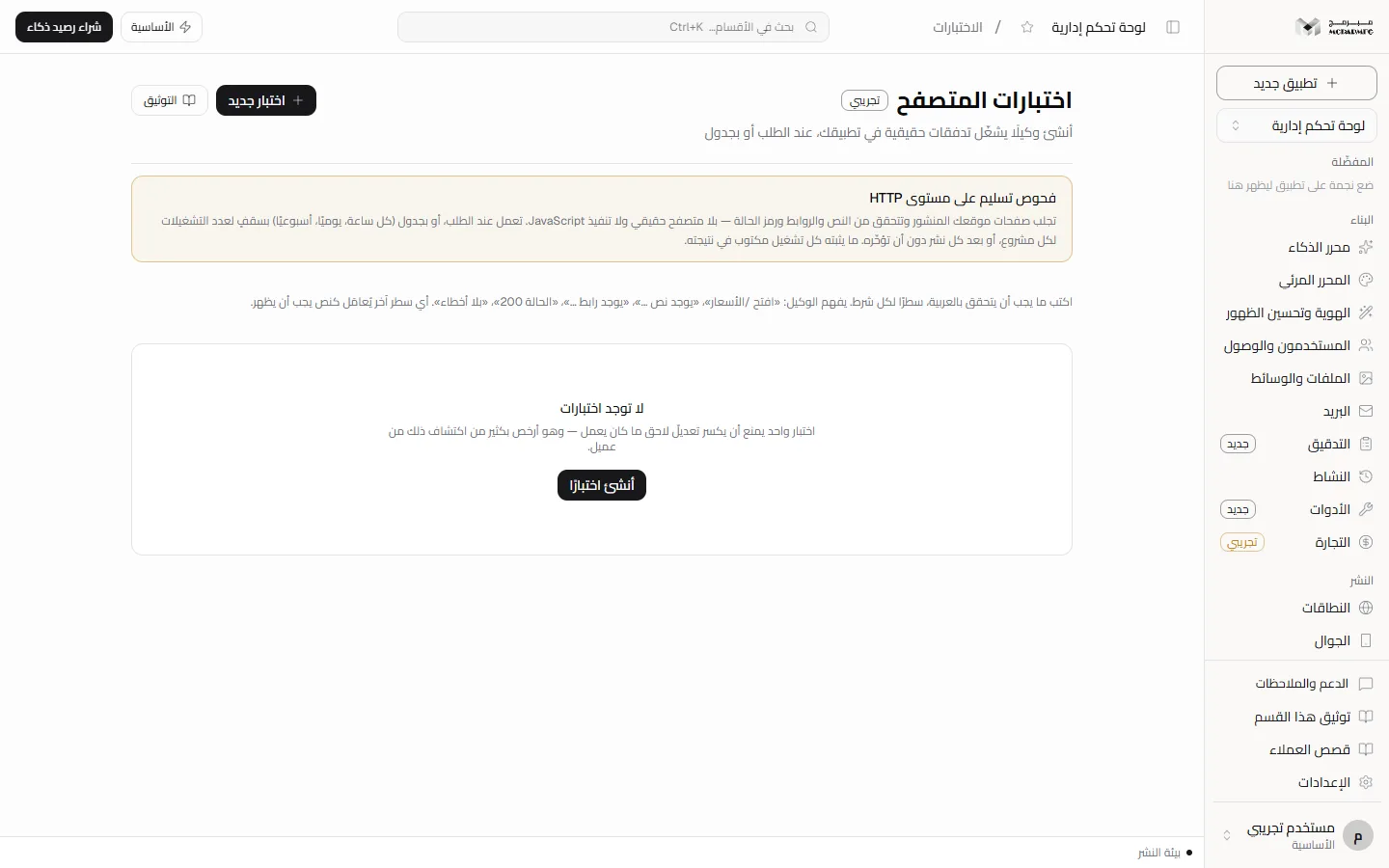
The «الاختبارات» (Tests) section, badged «تجريبي» (Beta), stores tests that request your published site's pages and check their content, run on demand, on a schedule or after every publish. The page title says «اختبارات المتصفح» (Browser tests), but what runs in the code is an HTTP-level delivery check: no real browser and no JavaScript execution.
On this page
What actually runs
When you press «شغّل» (Run), the Moparmeg server requests the page from your published site address (/your-site on the platform domain) with the user agent Mubarmij-TestAgent/1.0, reads the HTML as delivered, then judges your steps and criteria. No browser is opened and no JavaScript runs, so content rendered after load is invisible to the test. The screen says this in the «فحوص تسليم على مستوى HTTP» (HTTP-level delivery checks) box and under every result.
Not available yet: three options appear in the create form and are saved but do not change the run: «بهوية مستخدم آلي» (As a bot user — the email is required but the request goes out signed-out), «العمل الحالي» (Current work — the published site is always tested), and the screen sizes «سطح المكتب» / «لوحي» / «جوال» (Desktop / Tablet / Mobile — there is no browser to resize). The «مفعّل» (Enabled) switch does not block a manual run, but it does stop scheduled and after-publish runs.
Create a test
- Open your project and choose «الاختبارات» (Tests) in the sidebar.
- Press «اختبار جديد» (New test) at the top, or «أنشئ اختبارًا» (Create a test) when the list is empty («لا توجد اختبارات», No tests).
- Type a name in the field «اسم الاختبار — مثال: نموذج التواصل يعمل» (Test name — e.g. the contact form works).
- Type the start path in the field showing «/» (the home page by default).
- In «تعليمات الاختبار *» (Test instructions) write one step per line using the forms below.
- In «معايير النجاح *» (Success criteria) write at least one condition, pressing «أضف معيارًا» (Add a criterion) for each extra one.
- Optionally fill «خطوات التنظيف (اختياري)» (Cleanup steps, optional).
- Pick a schedule from the «الجدول» (Schedule) list: «عند الطلب فقط» (On demand only), «كل ساعة» (Hourly), «يوميًا» (Daily) or «أسبوعيًا» (Weekly), and tick «شغّله عند كل نشر» (Run on every publish) if you want.
- Press «إنشاء» (Create). The message «أُنشئ الاختبار» (Test created) appears and the test is listed; «إلغاء» (Cancel) backs out.
Automatic runs: schedule and after publish
- Schedule: the platform's frequent job (
/api/cron/frequent) runs a test once an hour, a day or a week has passed since its last run, per your choice. Only enabled tests in published projects run, oldest-run first, with caps: 3 runs per project per cycle, 48 per project per 24 hours, and 20 for the whole cycle. Change the schedule later from the list in the test row. - After publish: every publish (from the browser or the API) queues a run for each enabled test marked «شغّله عند كل نشر», up to 10 tests, and starts them without delaying the publish. A test with a queued run that has not started is not queued twice; if the project is not published when the run executes, it fails with «المشروع غير منشور — لم يُشغَّل الاختبار» (The project is not published — the test did not run).
- Scheduled and after-publish runs are stored exactly like manual runs, so you read their results the same way.
Step and criterion forms
- «افتح /path» (open; also «زر» or «انتقل إلى»): requests the page. Without any open line the test starts at the start path.
- «يوجد نص …» (text exists; also «يظهر»): searches the visible text after tags are stripped, so a match inside a class name or URL does not count.
- «يوجد رابط …» (link exists; also «رابط»): searches anchor tags for a matching href or link text.
- «الحالة 200» (status 200): compares the status code of the last page requested.
- «بلا أخطاء» (no errors): fails if the page contains strings such as
Application error,500 Internal Server ErrororUnexpected token. - Any other line is treated as text that must appear.
Success criteria are judged one by one against the last page the flow reached. Start a criterion with «لا يوجد», «بدون» or «يجب ألا» (there is no / without / must not) to negate it. Cleanup runs only open lines; a cleanup failure shows as its own step and does not fail the test.
Run and read the result
- In the test row press «شغّل» (Run) and wait for the request to finish.
- The coloured dot turns passed or failed; the row shows the schedule («عند الطلب فقط», «كل ساعة», «يوميًا» or «أسبوعيًا»), «بعد كل نشر» (after every publish) if chosen, then «آخر تشغيل» (last run) with its date, or «لم يُشغَّل بعد» (not run yet) before the first run.
- Press the «عرض النتيجة» (Show result) arrow to see «معايير النجاح» (Success criteria) with a verdict for each, then every step with its detail and duration in milliseconds («م.ث»).
The trash icon in the row deletes the test immediately, with no confirmation.
Refusals and failures
- «اسم الاختبار مطلوب» (Test name required) and «تعليمات الاختبار مطلوبة» (Test instructions required) for empty fields.
- «أضف معيار نجاح واحدًا على الأقل — اختبار بلا معيار ينجح دائمًا ولا يثبت شيئًا» (Add at least one success criterion — a test without one always passes and proves nothing).
- «اختر مستخدمًا آليًا صالحًا للتشغيل بهويته» (Choose a valid bot user) when the bot identity is chosen without a valid email.
- «جدول غير معروف — المتاح: كل ساعة، يوميًا، أسبوعيًا» (Unknown schedule — available: hourly, daily, weekly) for a schedule value the scheduler does not know.
- An open step that returns an error status or cannot be reached fails. If no page loaded at all, the following steps are recorded as skipped, not passed.
- The test requests the published site, so a project not yet published fails its open step. See Publishing.
- Text rendered only by JavaScript fails «يوجد نص» even though you see it in your browser.
Plans
The Tests section requires no capability from the plan contract, so it is unlocked on every plan, from «المجانية» (Free) to «الاحترافية» (Professional). For security and speed checks see Audit and Performance.
FAQ
Does the test open a real browser and click buttons?
No. It requests pages over HTTP and reads the HTML only; no clicks, no form filling, no JavaScript.
Does a test run on a schedule or after every publish?
Yes, if you choose it: an hourly, daily or weekly schedule, or «شغّله عند كل نشر» (Run on every publish), provided the test is enabled and the project is published. The caps are in «Automatic runs» above.