

Workspace sections
Workspace Code section — reading files and downloading a ZIP | Moparmeg
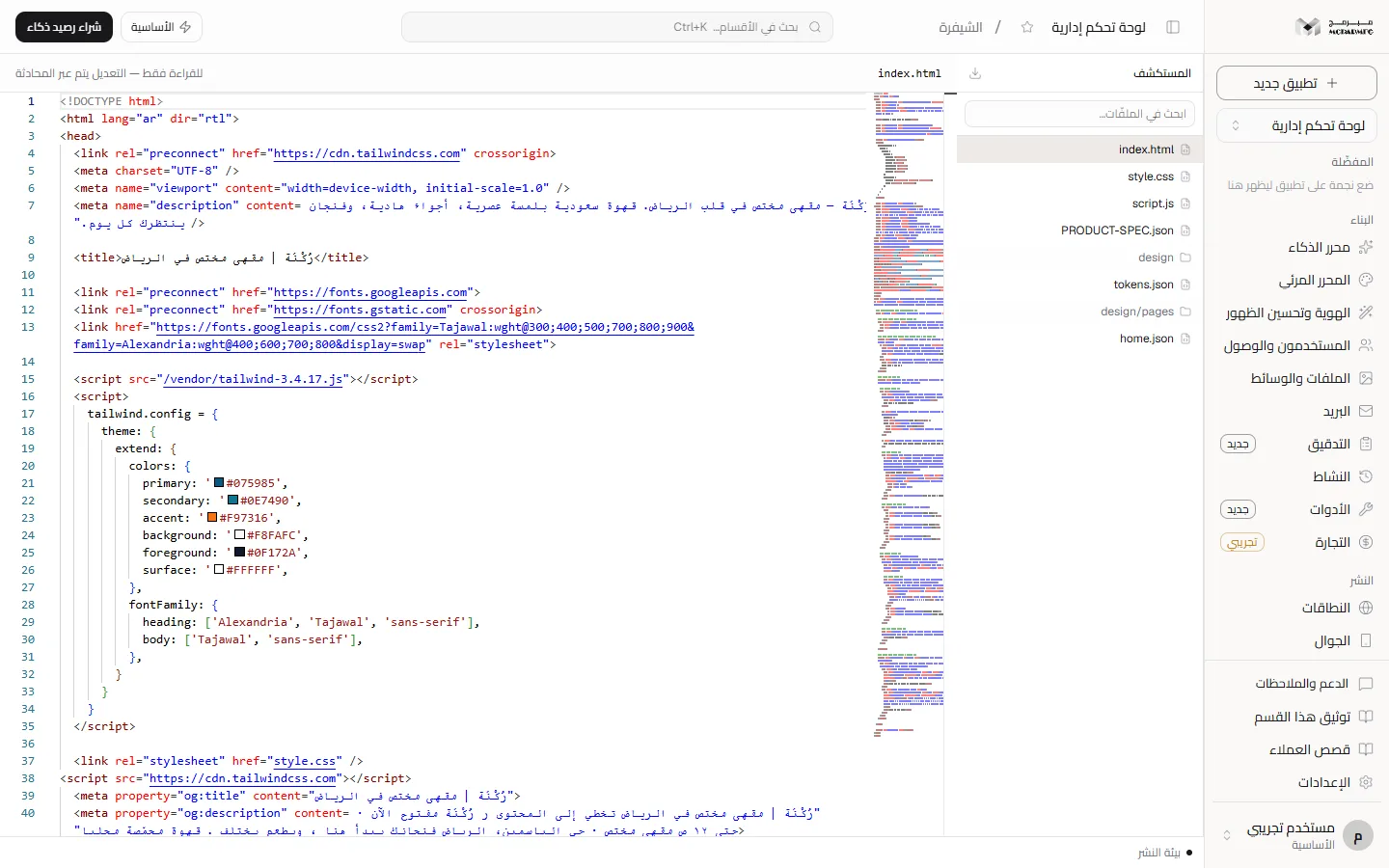
The «الشيفرة» (Code) section shows your project files as the agent built them in a read-only Monaco editor, with file-name search and a button that downloads the whole project as a ZIP. Nothing is edited here: changes go through chat or the visual editor.
On this page
Open the section
- Open your project and choose «الشيفرة» (Code) in the sidebar. The section fills the whole area, with no header.
- While loading, «جارٍ التحميل…» (Loading…) shows in the «المستكشف» (Explorer) panel.
- Files are grouped under their folder name; the first HTML file opens automatically, otherwise the first file in the list.
With no files you see «لا توجد ملفات بعد — ابدأ من المحادثة» (No files yet — start from chat). If loading fails you see «تعذّر تحميل الملفات» (Could not load files) or «تعذّر الاتصال بالخادم» (Could not reach the server).
Browse and search
- Type part of a file name or path in «ابحث في الملفّات…» (Search files…). The search matches names, not contents.
- With no match you see «لا ملفّ يطابق «…»» (No file matches).
- Click a file: its path appears above the editor together with «للقراءة فقط — التعديل يتم عبر المحادثة» (Read-only — editing happens through chat).
The editor wraps long lines, shows a minimap for navigating long files, and follows the app's light or dark theme. Syntax colouring is chosen from the file extension.
Why read-only
The editor is read-only on purpose, so there are never two conflicting places editing the same file. To change code ask in chat, or edit elements in the visual editor.
Download the project as ZIP
- Press the download icon next to the «المستكشف» (Explorer) heading (tooltip «تنزيل المشروع كملف مضغوط», Download the project as a compressed file).
- Your browser downloads a ZIP named from the project title with non-Latin characters removed, so an Arabic title may give a generic name.
- Open it: it contains your project files plus an added README and .gitignore, and the assets your site references (such as Tailwind and placeholder images) copied locally, so it runs without our servers. Next projects carry them under public; HTML projects under a vendor folder with relative references.
The same download is the «تنزيل ZIP» (Download ZIP) button in the «التصدير» (Export) tab of Settings.
Download failures: «غير مصرّح» (Unauthorized, 401) if your session expired, «كثرة الطلبات» (Too many requests, 429) after 10 downloads in a minute, and «المشروع غير موجود» (Project not found, 404) for a private project you do not own.
Export to GitHub
There is no GitHub button in the Code section itself; export lives in the «التصدير» (Export) tab of Settings, in the «تصدير إلى GitHub» (Export to GitHub) panel:
- Paste a GitHub token with repository-creation permission into «رمز الوصول الشخصي» (Personal access token).
- Type «اسم المستودع» (Repository name), or leave it empty to derive it from the project name.
- Keep «مستودع خاص» (Private repository) on or turn it off, then press «تصدير» (Export).
- On success «تمّ التصدير» (Exported) appears with a link to the new repository, which holds the project files in a first commit.
The token is sent once, the field is cleared after the request whether it succeeded or not, and it is not stored. Refusals: «الرمز مطلوب» (Token required), «المستودع "…" موجود بالفعل» (Repository already exists), and «غير موجود» (Not found) if you are not the project owner. The «التصدير» tab is shown only to the owner and platform admins. The same tab also has «النشر على Vercel» (Deploy to Vercel), «النشر على Netlify» (Deploy to Netlify) and «حزمة Docker» (Docker package) panels.
Plan limits
The Code section and the download are unlocked on every plan. What differs between plans is the number of projects and the size of one project's files, per the plan contract:
- «المجانية» (Free): up to 1 project(s), and up to 1 MB of files per project.
- «الأساسية» (Basic): up to 2 project(s), and up to 10 MB of files per project.
- «المميزة» (Premium): up to 5 project(s), and up to 50 MB of files per project.
- «الاحترافية» (Professional): unlimited projects, and up to 50 MB of files per project.
FAQ
Can I edit a file here and save?
No. The editor is read-only; editing happens through chat.
Does the ZIP contain my project secrets?
No. It contains project files only; secrets are stored outside the files, in the Secrets section.