

Building with AI
The Skills section — creating agent skills and their attachments
A skill is a named instruction: you write it once, and the agent receives it together with its «متى تُستخدَم» (when to use) description. The description is required because it is what the agent matches against your request. Every enabled skill is added to every build request, and the agent decides from its description when to apply it.
On this page
Open the section from the sidebar as «المهارات» (Skills); its subtitle is «تعليمات مُسمّاة يستدعيها الوكيل حين يطابق وصفها طلبك» (Named instructions the agent invokes when their description matches your request).
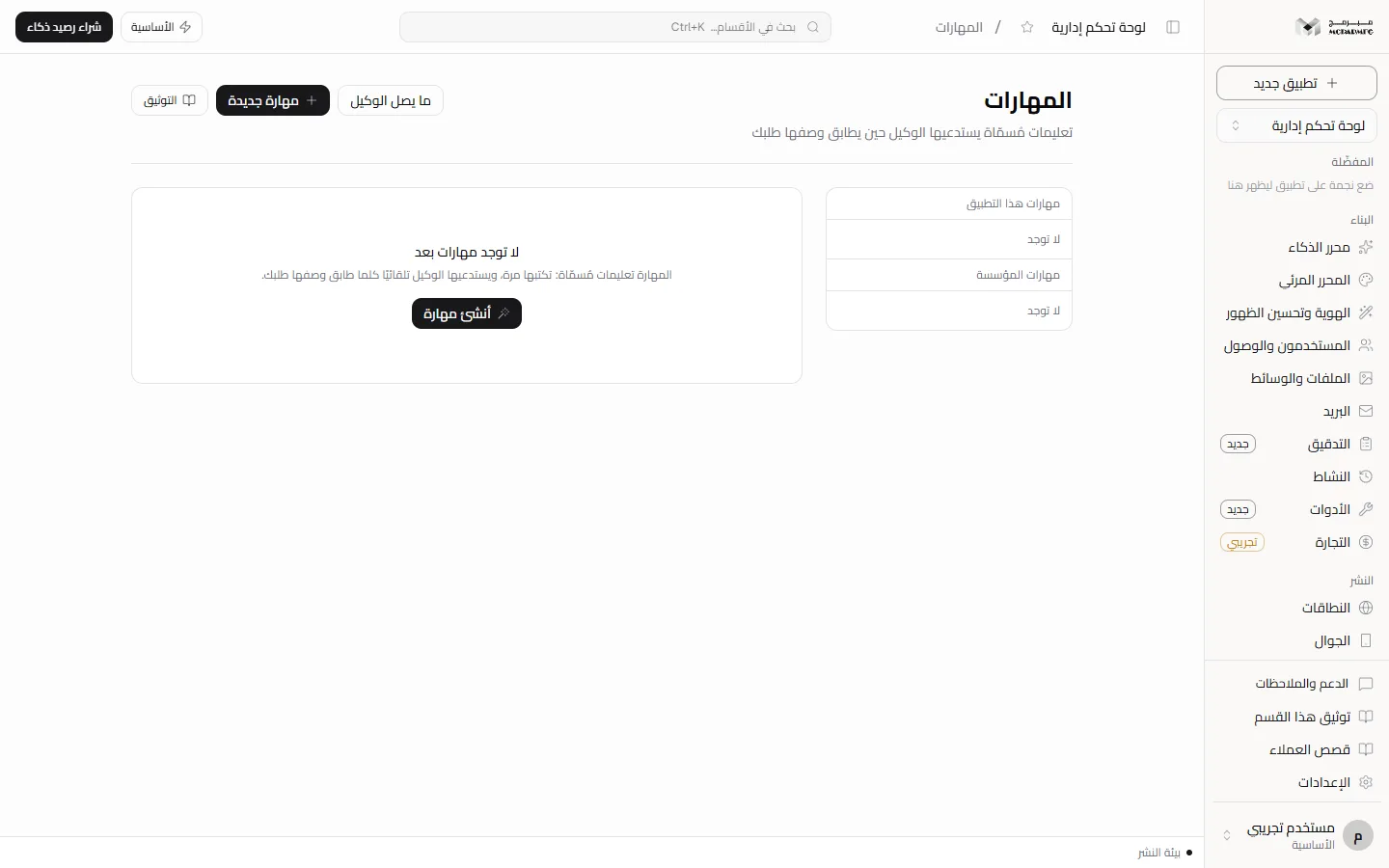
Creating a skill
- Press «مهارة جديدة» (New skill) at the top of the page, or «أنشئ مهارة» (Create a skill) if you have none.
- Type «اسم المهارة» (Skill name).
- Write the description in «متى تُستخدَم هذه المهارة؟» (When should this skill be used?). Below it: «هذا الوصف هو ما يطابقه الوكيل بطلبك — مهارة بلا وصف لا تُستدعى أبدًا.» (This description is what the agent matches against your request — a skill with no description is never invoked).
- Pick the scope: «هذا التطبيق فقط» (This app only) or «كل تطبيقاتي» (All my apps).
- Write the detailed instructions in the large box.
- Press «إنشاء» (Create); «أُنشئت المهارة» (Skill created) appears. An empty name is refused with «اسم المهارة مطلوب» (Skill name is required), and an empty description with «وصف المهارة مطلوب — به يعرف الوكيل متى يستدعيها» (A skill description is required — it is how the agent knows when to invoke it).
The two lists and scope
The side column shows «مهارات هذا التطبيق» (This app's skills) then «مهارات المؤسسة» (Organization skills). A disabled skill has a grey dot before its name.
Sharing «مهارات المؤسسة» with your teammates is Not available yet: a skill with the «كل تطبيقاتي» scope is tied to your account alone and reaches your own requests in all your apps, even though the list is titled «مهارات المؤسسة» (Organization skills).
A collaborator on the project sees the same «مهارات هذا التطبيق» (This app's skills), and under «مهارات المؤسسة» sees their own skills, not yours. Creating, editing and deleting need the «محرر» (Editor) or «مدير» (Admin) role; the «مشاهد» (Viewer) role is refused with «صلاحيتك في هذا المشروع للمشاهدة فقط» (Your access to this project is view-only).
Editing a skill
- Press the skill in the list. Its name and scope appear («خاصة بهذا التطبيق», specific to this app, or «على مستوى المؤسسة», organization level).
- Edit the description if you like; «الوصف هو ما يطابقه الوكيل بطلبك — لا يمكن تفريغه بعد الإنشاء.» (The description is what the agent matches against your request — it cannot be emptied after creation).
- Choose the editing mode: «نصّ منسّق» (Rich text) or «Markdown», or «معاينة» (Preview) to view the result without editing.
- Press «حفظ» (Save); «حُفظت المهارة» (Skill saved) appears.
- The «مفعّلة» (Enabled) switch saves immediately; a disabled skill does not reach the agent. The trash icon deletes the skill and its attachments immediately, with no confirmation.
Attachments
«ملف مرجعي يصل الوكيل مع نصّ المهارة — دليل أسلوب، مخطّط بيانات، أمثلة.» (A reference file that reaches the agent with the skill text — a style guide, a data schema, examples.)
- Type «اسم المرفق» (Attachment name), or the file name is used.
- Press «اختر ملفًا» (Choose a file) and pick a text file:
.md,.txt,.jsonor.csv. The number of characters ready is shown. - Press «أضف» (Add); «أُضيف المرفق» (Attachment added) appears. An attachment longer than 8000 characters is refused and you are asked to shorten or split it.
Attaching images, PDFs or binary files to a skill is Not available yet: attachments are read as text only.
What reaches the agent
- Press «ما يصل الوكيل» (What reaches the agent) at the top of the page (the number of enabled skills is shown next to it).
- A panel shows the exact text added to every build request: Personalize instructions, then each enabled skill with its title, «متى تُستخدَم» (when to use), details and attachments, then the enabled integrations.
- With no enabled skills you see «لا مهارات مفعّلة، فلا يصل الوكيل شيء من هنا.» (No enabled skills, so nothing reaches the agent from here).
The whole block is capped at 24000 characters. Beyond that you see «اقتُطع السياق لطوله — عطّل ما لا تحتاجه لتصل المهارات المهمّة كاملة.» (The context was truncated for length — disable what you do not need so the important skills arrive in full). Skills are ordered by creation date, so the newest are the first to be cut.
The matching is done by the agent itself: all enabled skills are sent with the request, and it reads «متى تُستخدَم» to decide which to apply. There is no server-side preselection, so disable what you do not need rather than piling up skills.
Plans and locking
The «المهارات» section requires the AI capability. On the «المجانية» (Free) plan the AI quota is 0 requests a day, so the section shows as locked and the server answers 402 with PLAN_CAPABILITY_REQUIRED and the text «الذكاء الاصطناعي متاح في الباقات المدفوعة فقط — خطة المجانية تشمل القوالب الجاهزة والمحرّر المرئي.» (AI is available on paid plans only; the المجانية plan includes ready templates and the visual editor).
- «الأساسية» (Basic): 50 AI requests a day.
- «المميزة» (Premium): 200 AI requests a day.
- «الاحترافية» (Professional): 1000 AI requests a day.
The build request in the chat is itself refused with status 402 and code AI_PAID_ONLY on the free plan, and with status 429 and code AI_RATE_LIMITED once the daily quota is used up. Upgrade from Billing.
If you are a collaborator on someone else's project, the section lock follows the project owner's plan, not yours. Sending a build request from the chat of a project you do not own is Not available yet: the server answers «المشروع غير موجود» (Project not found).
FAQ
I wrote a skill and the agent did not apply it — why?
Check that it is «مفعّلة» (Enabled) and appears in «ما يصل الوكيل», that its description describes your request in clear words, and that the block was not truncated before reaching it.
What is the difference between a skill and Personalize?
Personalize instructions are general and always apply. A skill is named and has a «متى تُستخدَم» description, so the agent applies it only to matching requests.