

Workspace sections
Workspace Push section — campaigns, subscribers and VAPID keys | Moparmeg
The «الإشعارات» (Notifications) section, titled «إشعارات الدفع» (Push notifications), lets you show a subscribe button on your published site, and write, save and send notification campaigns to those who subscribed. Subscribing and sending both depend on VAPID keys set in the platform server's environment; without them every campaign stays a draft.
On this page
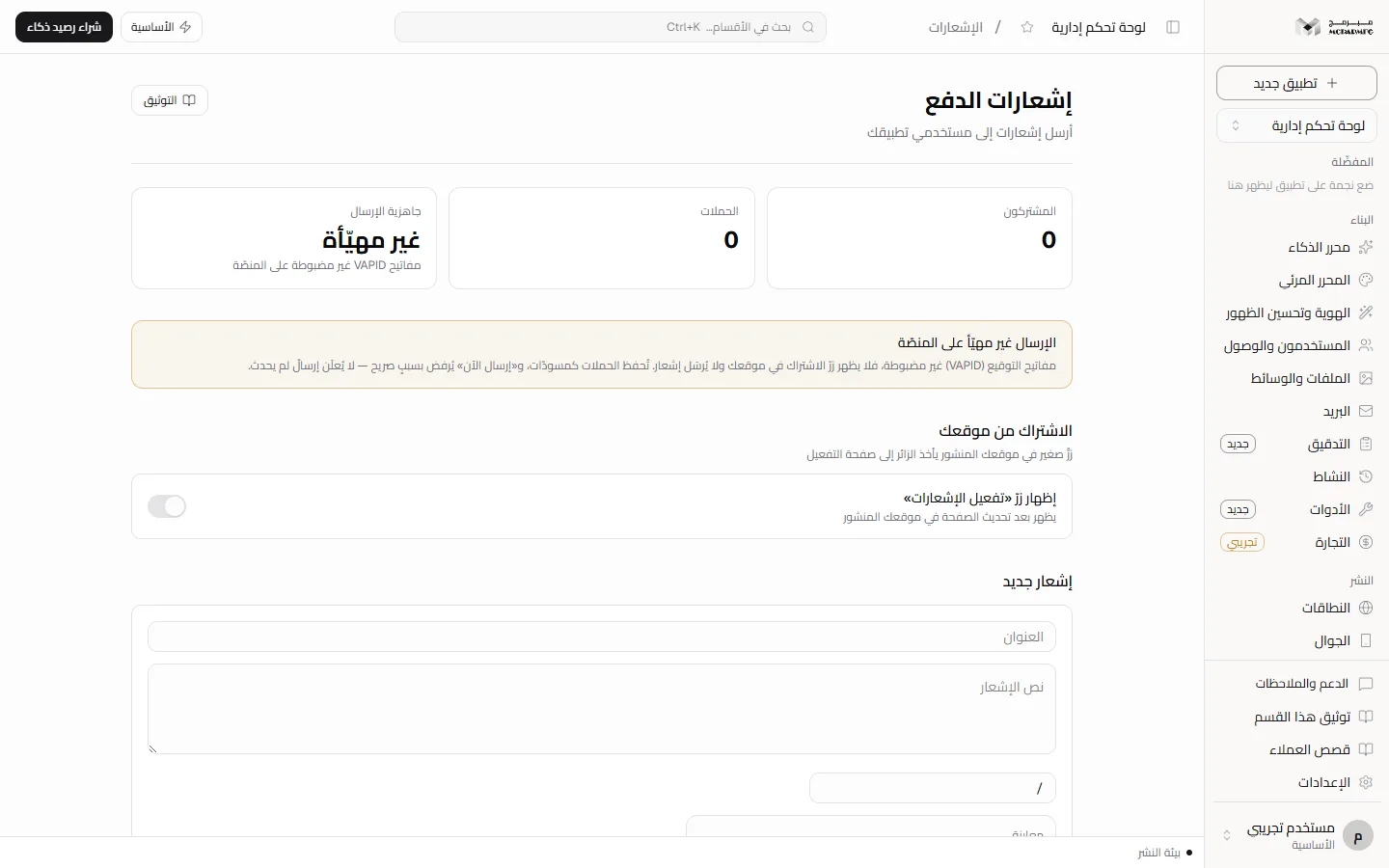
Sending condition: the platform needs three variables in its server environment: VAPID_PUBLIC_KEY, VAPID_PRIVATE_KEY and VAPID_SUBJECT (starting with mailto: or https://). If any is missing, «جاهزية الإرسال» (Sending readiness) shows «غير مهيّأة» (not configured), the subscribe button does not appear on your site, and «إرسال الآن» (Send now) is refused. These are the platform's keys, not your project's.
Who can open the section
The section requires the «الاستضافة» (Hosting) capability from the plan contract, available on «الأساسية» (Basic), «المميزة» (Premium), «الاحترافية» (Professional). On «المجانية» (Free) «الإشعارات» appears dimmed in the sidebar with a lock icon (labelled «متاح في الباقات المدفوعة», available on paid plans); opening it, the server answers 402 with: «الاستضافة متاح في الباقات المدفوعة فقط — خطة المجانية تشمل القوالب الجاهزة والمحرّر المرئي.» (Hosting is available on paid plans only — the Free plan includes ready templates and the visual editor). To upgrade see Billing.
What the screen shows
- «المشتركون» (Subscribers): how many subscriptions this project has.
- «الحملات» (Campaigns): how many campaigns are listed (up to 50).
- «جاهزية الإرسال» (Sending readiness): «مهيّأة» (configured) or «غير مهيّأة» (not configured) with the hint «مفاتيح VAPID غير مضبوطة على المنصّة» (VAPID keys not set on the platform). It reads whether the VAPID keys are set in the platform server's environment, not in your project. «مهيّأة» means the platform can sign a send, not that you have subscribers.
When it is «غير مهيّأة», a warning box titled «الإرسال غير مهيّأ على المنصّة» (Sending is not configured on the platform) appears below.
Visitor subscriptions
- Publish your site and make it public: the subscribe page only works for a published site with «الظهور العام» (Public visibility) on (see Publishing and Settings).
- In the «الاشتراك من موقعك» (Subscribe from your site) panel turn on «إظهار زرّ «تفعيل الإشعارات»» (Show the Enable notifications button). You see «سيظهر زرّ الإشعارات في موقعك المنشور» (The button will appear on your published site), or the warning «حُفظ الاختيار، لكن الزرّ لا يظهر في موقعك قبل ضبط مفاتيح VAPID على المنصّة» (Saved, but the button will not appear until VAPID keys are set on the platform).
- After refreshing your site a floating «تفعيل الإشعارات» (Enable notifications) link appears. To place it yourself, add the attribute
data-mubarmij-push-buttonto any element on your page; it replaces the floating link. - The visitor follows the link to the activation page on the platform domain (its address shows in the panel once enabled), presses «تفعيل الإشعارات», allows notifications in the browser, then «العودة إلى الموقع» (Back to the site). The same page offers «إيقاف» (Stop).
The step out to the platform is needed because the published site runs in an isolated environment where the browser cannot subscribe; that is why notifications show the platform's domain name. The limit is 50,000 subscribers per site («بلغ الموقع الحدّ الأعلى للمشتركين», the site reached the subscriber limit).
Write and save a campaign
- Open «الإشعارات» (Notifications) from the sidebar.
- In the «إشعار جديد» (New notification) panel type «العنوان» (Title) and «نص الإشعار» (Notification text).
- Change the link field if needed (default «/»): a path starting with / for a page on your site, or a link starting with https://. The notification opens it when clicked.
- Check the «معاينة» (Preview) box, which shows the title and text as typed.
- Press «حفظ كمسودّة» (Save as draft). The message «حُفظت المسودّة» (Draft saved) appears and the campaign is listed under «الحملات» (Campaigns) marked «مسودّة» (Draft).
Sending
«إرسال الآن» (Send now) saves the campaign first, then sends it. Every unsent campaign under «الحملات» also has a «إرسال» (Send) button, disabled while readiness is «غير مهيّأة».
- No VAPID keys: status 501, code
PUSH_SEND_UNAVAILABLEand the message «الإرسال غير مهيّأ على المنصّة: مفاتيح VAPID غير مضبوطة — حُفظت الحملة كمسودّة ولم تُرسَل» (Sending is not configured on the platform: VAPID keys not set — the campaign was saved as a draft and not sent). - No subscribers: «لا مشتركين بعد — لم يُرسَل شيء وبقيت الحملة مسودّة» (No subscribers yet — nothing sent, the campaign stays a draft).
- More than 10 send attempts per hour for the project: «بلغت حدّ الإرسال في الساعة — بقيت الحملة مسودّة» (Hourly send limit reached — the campaign stays a draft).
- A send goes to the oldest 5,000 subscribers and shows «أُرسل إلى … مشتركًا» (Sent to … subscribers). Subscriptions the browser has cancelled are removed automatically.
- A campaign is marked sent, with its recipient count and date, only if at least one push service accepted it; otherwise it shows «لم يُسلَّم · فشل …» (Not delivered · failed …) with «لم تقبل أيُّ خدمة دفعٍ الإشعار — راجع المشتركين وأعد المحاولة» (No push service accepted the notification — check subscribers and retry). A sent campaign cannot be sent again («أُرسلت هذه الحملة من قبل», already sent).
Subscribers panel
For each subscriber the panel shows only the push service host (not the full endpoint, which would allow messaging that browser), the browser description and the subscription date, up to 200 entries. Before the first subscription you see «لا يوجد مشتركون» (No subscribers).
Deleting and errors
- The trash icon next to a campaign deletes it immediately, with no confirmation.
- «عنوان الإشعار مطلوب» (Title required) and «نص الإشعار مطلوب» (Text required) for empty fields, and «رابط الإشعار يبدأ بـ/ لصفحةٍ في موقعك أو بـhttps://» (The link must start with / or https://) for an unaccepted link.
- The capability message above (402) if your plan does not include hosting.
For mobile app notifications see Mobile.
FAQ
Readiness says «مهيّأة» (configured) — will my campaign arrive?
It reaches those who actually subscribed from your site's button and whose push services accept it. Check the «المشتركون» (Subscribers) count and the campaign result under «الحملات».
Can I use my own VAPID keys?
Not available yet. The push route reads only the platform server's environment keys, and there is no screen to enter your own.