

Publishing and domains
Domains: the free subdomain and connecting your own domain
The Domains section of a project workspace is the one place that decides your app's web address. Every app gets a free subdomain, and paid plans can connect domains they own. A domain is only shown as a link once the server actually serves it with an active certificate.
On this page
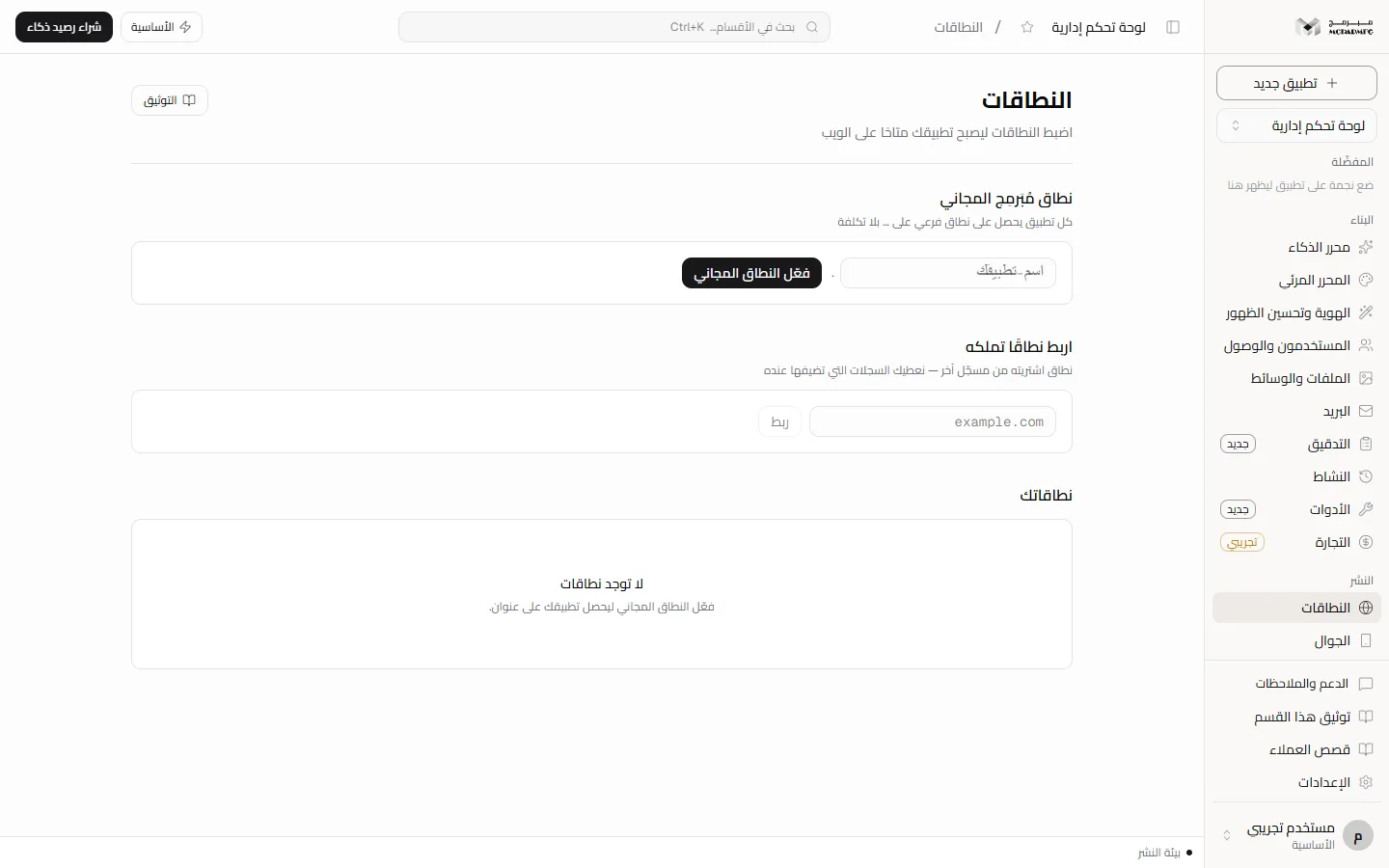
Opening the section
In the project workspace sidebar, under «النشر» (Publish), click «النطاقات» (Domains). The section is open to every plan, but some panels are locked on the free plan as described below.
The free Mubarmij subdomain
The «نطاق مُبَرمِج المجاني» (Free Mubarmij domain) panel shows the root your subdomain is created under.
- Type a name, or leave it empty to use the suggested name (your project's short name).
- Click «فعّل النطاق المجاني» (Activate the free domain).
- On success you see «النطاق الفرعي نشط» (Subdomain active) and the button becomes «مُفعَّل» (Activated).
Rules: lowercase letters, digits and hyphens only; names the platform uses, such as www, mail, api and admin, are refused with «اسم تستعمله المنصّة — اختر اسمًا آخر» (a name the platform uses, pick another); one subdomain per app, so delete the current one to choose another.
If the panel shows «أداة تقديم النطاقات غير مثبّتة على هذا الخادم — يُحجز الاسم لك ويُفعَّل عند تثبيتها» (the domain serving tool is not installed on this server; the name is reserved and activates once installed), the name is yours but stays «قيد التفعيل» (activating). Activation is Not available yet on that server and Requires contacting support.
Connect a domain you own
The «اربط نطاقًا تملكه» (Connect a domain you own) panel is for a domain bought from another registrar. Its badge shows usage against your limit (for example 0/1).
- Type the domain (for example
example.com) and click «ربط» (Connect). - You see «أُضيف النطاق — أضف السجلات ثم تحقّق» (Domain added, add the records then verify); the domain appears under «نطاقاتك» (Your domains) as «بانتظار السجلات» (Awaiting records) with its records table.
- Add the records at your registrar exactly as shown, then click «تحقّق الآن» (Verify now). Propagation can take up to an hour.
The limit counts your whole account, not the project: owned domains across all your projects add up. At the limit the field is disabled, «بلغت حدّ النطاقات المخصّصة في باقتك.» (You reached your plan's custom domain limit) appears, and the server refuses with HTTP 402.
If you see «ربط النطاقات المملوكة غير مهيّأ على هذا الخادم بعد.» (connecting owned domains is not configured on this server yet), the server address the records point to is not set: connecting is Not available yet and Requires contacting support.
Records you add
The records are generated once, at connect time, and do not change while you copy them:
| Type | Name | Value | TTL |
|---|---|---|---|
| A | @ | The Mubarmij server address shown in the table | 3600 |
| A | www | The same Mubarmij server address used for @ | 3600 |
| TXT | _mubarmij | mubarmij-verify= followed by your domain's verification token | 3600 |
If your domain's DNS zone is with us (from the «إدارة DNS» (DNS management) panel below), a «انشر السجلات في منطقتي» (Publish the records to my zone) button appears above the table and writes them into the zone instead of you copying them; without a zone the button is absent and the table stays for copying.
When your domain is first served, the server requests a Let's Encrypt certificate for it and adds www to the certificate and the server block only when every www address points to our server address. If extending the certificate to www fails, the main domain is served on its own.
Do not give www a CNAME to your Mubarmij subdomain or the platform root: it resolves to addresses other than our server's, so www is not added to the certificate and the site is not served from it over https. A domain connected before this change may still show a saved CNAME for www in its table; replace it at your registrar with an A record to the apex address.
If www was not added, a reason appears under the domain along the lines of «www.… لم يُضف إلى الشهادة بعد — أضف عند مسجّلك سجل A باسم www قيمته … (عنوان الجذر نفسه) واحذف أي CNAME على www، ثم اضغط «أعد فحص www». قد يحتاج الانتشار حتى ساعة» (www is not in the certificate yet: add an A record named www with the apex address, delete any www CNAME, then click «أعد فحص www»; propagation can take up to an hour). After fixing the record click «أعد فحص www» (Recheck www) next to the served domain: it re-checks ownership and routing, then serves the domain again so the certificate extends to www if it now points to us, and shows «www.… مخدوم بشهادته» (www is served with its certificate) or the reason.
The button appears for an owned domain only after it was first served, needs manage access in the project, and is limited to five attempts per ten minutes per domain («كثرة الطلبات لهذا النطاق، حاول بعد دقائق», too many requests for this domain). A domain not served yet is refused with «النطاق لم يُقدَّم بعد — اضغط «تحقّق الآن» أوّلًا» (not served yet, click «تحقّق الآن» first).
Verification and states
«تحقّق الآن» (Verify now) really queries DNS for two separate things: ownership (the TXT record) and routing (every IPv4 address the domain resolves to must be our server address alone). The states next to a domain:
- «بانتظار السجلات» (Awaiting records): one of the two is not proven. The reason is shown underneath, for example «لم يُعثر على سجل TXT باسم _mubarmij» (no TXT record named _mubarmij), «سجل TXT موجود لكنه لا يحمل رمز التحقق لهذا النطاق» (TXT exists but lacks this domain's token), «لا سجل A أو CNAME على النطاق» (no A or CNAME record) or «النطاق يشير إلى … لا إلى … وحده» (the domain points to … not to … alone). A CNAME to your Mubarmij subdomain or the platform root is refused with «النطاق يشير بـCNAME إلى … فيحلّ إلى … لا إلى … — نطاقات مُبَرمِج الفرعية تمرّ عبر Cloudflare فلا تصدر عليها شهادة لنطاقك» (the domain CNAMEs to … which resolves to … not to …; Mubarmij subdomains go through Cloudflare, so no certificate can be issued for your domain on them). A routing refusal also shows «أضف عند مسجّلك سجل A للاسم … قيمته … واحذف أي CNAME أو سجل A آخر عليه» (add an A record for … with value … and delete any CNAME or other A record on it).
- «الملكية والتوجيه مؤكَّدان — بانتظار الشهادة والتقديم» (Ownership and routing confirmed, awaiting certificate and serving): records are correct, but the SSL certificate and serving are not done.
- «نشط · شهادة SSL نشطة» (Active, SSL certificate active): the server serves the domain with an active certificate; only then does the name become a clickable link.
This is the same rule the server applies when issuing the certificate: the domain passes when every IPv4 address it resolves to is our server address, so a CNAME that ends at our address passes, while two A records, one to our address and one elsewhere, are refused. A domain that carries an AAAA record is refused too: our server has no IPv6 and Let's Encrypt tries IPv6 first, so issuance would fail, and the status tells you to delete the AAAA record.
After issuance certbot renews the certificate automatically and reloads the server. A daily job reads the certificate expiry of every served owned domain, and if seven days or one day remain without renewal you get a notice in the dashboard and by email.
Issuing the certificate and serving an owned domain run through a tool on the platform server. When it is not installed the domain stays at «الملكية والتوجيه صحيحان — إصدار الشهادة وتقديم النطاق ينتظران تثبيت أداة النطاقات على الخادم» (ownership and routing correct; certificate and serving wait for the domain tool). This is Not available yet and Requires contacting support.
To remove a domain click its trash icon. A served domain is removed from the server first; if that cannot happen you see «النطاق مخدوم على المضيف وأداة إزالته غير متاحة هنا — راسل فريقنا» (served on the host and the removal tool is unavailable here, contact our team).
Buying or transferring a domain
Below are «اشترِ نطاقًا» (Buy a domain), «انقل نطاقك إلينا» (Transfer your domain to us) and the «طلبات النطاقات» (Domain orders) list. The same panels also appear on the «نطاقاتي» (My domains) dashboard page (see below).
- In «اشترِ نطاقًا» type a name (for example
example.com, or a name without an extension) and click «ابحث» (Search). Several extensions are searched, and the table shows each domain as «متاح» (available), «مسجَّل» (registered) or «غير معروف» (unknown), with a SAR price or «يسعّره فريقنا» (priced by our team) in the «السعر (السنة الأولى)» (first-year price) column. - Click «اختر» (Choose) next to the domain, set the years, fill the registrant name, email and mobile, then click «اطلب الشراء» (Request purchase). If the domain has a computed price the order moves straight to «بانتظار الدفع» (awaiting payment); otherwise it stays «بانتظار التسعير من فريقنا» (awaiting our quote).
- To transfer, fill «انقل نطاقك إلينا» with the EPP transfer code (or send it later), then «اطلب النقل» (Request transfer). The code is stored encrypted and never shown again.
- Follow the order in «طلبات النطاقات»: «بانتظار التسعير من فريقنا» (awaiting our quote), «بانتظار الدفع» (awaiting payment; the «ادفع … ر.س» button opens Moyasar's payment page), «جاهز — ينفّذه فريقنا» (ready, our team executes), «قيد التنفيذ» (in progress), «منجَز» (done). A transfer without a code waits at «بانتظار رمز النقل» (awaiting transfer code), and a transfer in progress shows a «حالة النقل» (Transfer status) button.
Automatic pricing and registration through a registrar API work only when the platform has configured a provider, its credentials and the markup: Name.com supports purchase, transfer and renewal; Hostinger supports search, pricing and reading transfer status only. Without a configured provider our team prices the order and buys or transfers the domain by hand. Even with a provider, execution does not start by itself after payment: our team triggers it, and anything the provider does not support is completed by hand and Requires contacting support.
Saudi .sa domains (including com.sa) are always registered by hand through the Saudi Network Information Center once the documents are complete: their availability cannot be read automatically, so it shows «غير معروف» (unknown), they are not priced automatically, and our team contacts you. This path Requires contacting support.
My domains: expiry and renewal
The «النطاقات» (Domains) item in the dashboard sidebar opens «نطاقاتي» (My domains). Its «المحفظة» (Portfolio) lists the domains you registered or transferred through us once their order is done, with status, expiry date («ينتهي … — بعد … يومًا», expires … in … days) and registrar. The portfolio is shown on every plan; buying and transferring from it are for paid plans.
- «جدّد سنة» (Renew one year) creates a renewal order that appears in «طلبات النطاقات» and is priced and paid like any order.
- «تجديد تلقائي» (Auto-renew) never charges a card: when the domain enters its last thirty days the platform creates one renewal order and notifies you to pay it.
- The daily maintenance job sends a notice in the dashboard and by email thirty days, seven days and one day before the domain expires.
Notices need a known expiry date: a domain showing «تاريخ الانتهاء غير معروف بعد» (expiry date not known yet) gets no notice, and the date updates automatically only from a provider that can read it. When «التجديد يُنفَّذ يدويًا بعد الدفع» (renewal is done by hand after payment) appears next to a domain, carrying out the renewal at the registrar is done by our team and Requires contacting support. A domain you connect from another registrar in «اربط نطاقًا تملكه» is not in the portfolio; it renews at its own registrar.
DNS management
The «إدارة DNS» (DNS management) panel creates a zone for your domain on our name servers: type the domain, click «أنشئ منطقة» (Create zone), then delegate your domain at your registrar to the «خوادم الأسماء» (name servers) shown. The state is «بانتظار تفويض خوادم الأسماء» (awaiting name-server delegation) until delegation completes, and «حدّث الحالة» (Refresh status) asks again. «السجلات» (Records) lists the zone's records and adds A, AAAA, CNAME, TXT, MX, NS, SRV or CAA records with «أضف سجلًا» (Add record).
If you see «إدارة DNS غير مهيّأة على هذا الخادم بعد.» (DNS management is not configured on this server yet), zone management is Not available yet on that server and Requires contacting support.
Plan limits
| Plan | Free subdomain | Owned domains (per account) |
|---|---|---|
| المجانية (Free) | One per project | 0 — connect, buy, transfer and DNS panels are locked |
| الأساسية | One per project | 1 |
| المميزة | One per project | 5 |
| الاحترافية | One per project | 5 |
On the free plan locked panels read «… متاح في الباقات المدفوعة — خطتك الحالية تشمل القوالب الجاهزة والمحرّر المرئي.» (available on paid plans; your plan includes templates and the visual editor) with an «ترقية الباقة» (Upgrade plan) link. See Billing and plans, and once connected publish from Publish.
FAQ
I clicked «تحقّق الآن» and got «لم يكتمل التحقق بعد» (verification not complete yet). What now?
Read the reason under the domain, compare your records to the table character by character, wait for propagation (up to an hour) and retry. Verification is limited to twenty attempts a minute.
Can I use a CNAME record at the domain root?
No. The table asks for an A record at @ because most registrars refuse CNAME at the root.